Balancing Humor and Realism in Meme-Style AI Videos
Viggle
Balancing Humor and Realism in Meme-Style AI Videos#
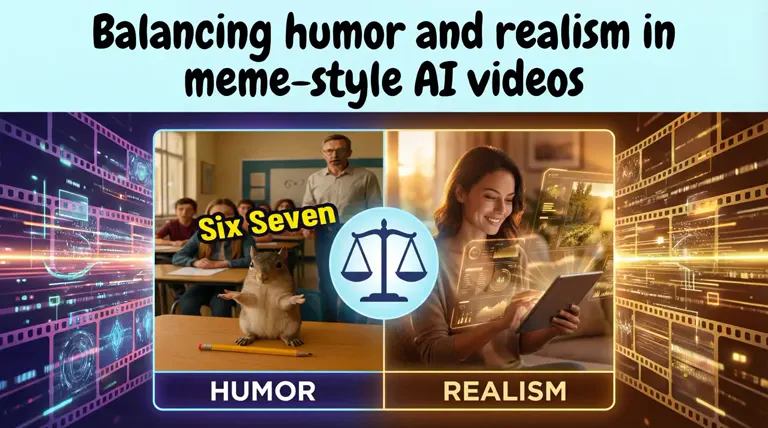
Sometimes you post something that feels hilarious…and the audience just scrolls. Then you make another one that looks super realistic, and nobody laughs. It's confusing because the same idea could explode if the balance were just slightly better. Right?
AI motion plays a huge part in this balance. If the motion is too exaggerated, the joke becomes forced. If it looks too natural, it loses the "meme energy" completely. The motion style literally decides whether your audience laughs or swipes away.
That's where Viggle helps you choose exactly how unhinged or realistic a character should move. It gives you control over the comedic tone, rather than leaving it to random effects.
In this blog, we'll break down how humor and realism work together in AI memes and how you can use Viggle AI to make meme-style videos that feel intentional, not accidental.
So, let's get started!
Why Is Balance Important in Meme Videos?#
When you're making meme-style AI videos, the goal is to make people feel something instantly. But if you keep it too real…the joke disappears. If it's too chaotic, the audience doesn't even understand what they're looking at.
The solution here? A perfect balance because it decides whether someone laughs… or just scrolls away. Let's break down what can go wrong on both sides.
Too Much Realism Means An Uncanny Valley#
In meme-style AI videos, realism works best with smooth motion, and familiar environments give the viewer a clear starting point. Once that feels believable, even the weirdest twist becomes funnier.
That's exactly how you avoid the Uncanny Valley. Instead of motion feeling too real for the visuals, it feels real enough to set up a good joke.
For example, in this video, the opening scene looks like a regular lifestyle video. The dialogue, "Mom, why are we so rich?" is a familiar meme setup. So the viewer is already locked into the context.
And then comes the twist.
- The world suddenly flips into a Roblox-style animation
- The reference to "Grow a Garden" appears in a funny, unexpected way
- Realistic movement continues, so the transition feels intentional, not random
Here, realism does its job:
- It builds a believable scenario
- It gives viewers time to connect with the characters
- It makes the reveal stronger and clearer
Instead of confusing, the style shift delivers the punchline.
So the rule becomes simple: Realism should set the stage, and humor should break it, not the other way around.
Too Much Distortion Makes The Joke Lose Its Clarity#
When distortion goes overboard, the audience can't even tell what the joke is anymore. A little chaos is funny, but when every frame is shaking, zooming, or warping, the expression and punchline get lost. Here's a quick breakdown of distortion elements that can ruin clarity:
| Distortion Style | What Goes Wrong |
|---|---|
| Excessive shaking | The reaction becomes unreadable |
| Rapid zoom-in/out | No focus? The joke might not land |
| Warped faces or limbs | Emotion disappears |
| Too many visual overlays | Screen looks messy and chaotic |
If the viewer has to think twice to understand the joke, the moment has already passed. So, keep the chaos fun… but keep the joke readable.
Good Meme Videos Sit In The Middle#
Good meme-style AI videos sit right between real enough to understand and silly enough to laugh at. For example, this Gojo & Geto reel nails that balance perfectly.
It starts with a realistic walk cycle. They're just casually walking across a bridge with calm expressions. The background looks real-world enough that the viewer instantly gets the scene.
Then the humor kicks in without breaking clarity. So the viewer experiences:
- Understanding: "Oh, they're just walking somewhere."
- Surprise: "WHAT just happened??"
- Laughter: Because it makes perfect sense for these characters
It's a formula you can actually follow*: Relatable setup + Silly twist = Clean, shareable humor*
That's the sweet spot every meme creator should aim for: Clear enough to follow. Unreal enough to laugh.
How Do AI Motion Tools Add Humor?#
Motion is where the joke comes alive. Even a simple pose gets funnier when the movement exaggerates the character, supports the timing, and reacts properly to the moment. Here's how AI motion tools make that happen:
Exaggerated Movements#
Bigger-than-normal movements instantly shift the tone from serious to silly. When a character leans too far, walks too confidently, or gestures way more than needed, it makes the situation funny without needing extra effects.
Here's why it boosts humor:
- Turns normal actions into joke delivery
- Makes reactions easier to read at a glance
- Adds "dramatic energy" that fits meme humor
Small movement ≈ realistic Big movement ≈ funny It's that simple. REALLY!
Comic Timing#
Even a great joke fails if the timing is off. AI motion lets creators adjust exactly when the funny part happens, and that can change the entire reaction. The punchline must hit right when the viewer expects it or just a second after. Here's how timing affects comedy:
| Timing Style | What It Creates | Why It's Funny |
|---|---|---|
| Sudden motion shift | Surprise | Viewer didn't see it coming |
| Pause and then motion | Build-up | Tension turns into laughter |
| Reaction to the beat drop | Sync with audio | Feels intentional + satisfying |
| Quick loops | Rewatch trap | Joke gets funnier each time |
Good timing = fewer scrolls + more replay value.
Reaction-Based Animations#
Humor lands strongest when the character's movement responds to something: a sound, a caption, a twist in the scene. The audience instantly understands what the character is reacting to and why it's funny. Here's why reactions matter:
- They give the meme a clear point of view
- Viewers connect faster because they've "felt that"
- Motion becomes part of the punchline, not just decoration
Reactions make the joke easier to feel, not just see.
What Level of Realism Should Meme Videos Maintain?#
Realism helps viewers quickly understand the scene. If they instantly get what the character is doing, they're free to focus on the joke, not the technical issues. So, here are some small details to keep the funny part clear:
Smooth Motion#
If the movement flows naturally, the viewer accepts the action and pays attention to the humor instead of the mechanics.
- No random freezes or jerky limbs
- Looks intentional, not accidental
Smooth motion keeps the setup believable, so the twist lands harder.
Face Stability#
The face carries the emotion. If it keeps sliding or warping, the viewer loses the reaction and eventually, the joke weakens. Here's a video showing how face stability makes all the difference.
So, keep expressions clear and in place for the viewers to read the mood instantly.
Stable face = punchline delivered correctly.
Body Proportion Accuracy#
If proportions break in the wrong way, the viewer gets distracted trying to understand the mistake instead of laughing. So, 2 things to keep in mind here:
- Avoid limbs stretching or clipping
- Let exaggeration come from motion, not errors
Realistic proportions keep the humor from turning awkward.
Natural Transitions#
When shots or movements cut cleanly, the viewer stays in the joke, not the edit. Whereas choppy or sudden shifts take attention away from what matters. That's why good transitions help the audience:
- Understand the setup
- Notice the twist
- Laugh at the change, not the cut
If the transition is invisible, the joke lands loud and clear.
How to Use Viggle to Balance Humor & Realism in Meme Videos#
Now that you know what to look out for in motion and expressions, let's see how to actually apply that balance while you create. Viggle gives you simple ways to push the realism up or down until the joke feels just right. Here's a step-by-step guide on how to create realistic, funny meme-style AI videos:
- Sign up on Viggle AI using your email address, Google account, or Apple account. If you're an existing user, click "Sign In" in the top-right corner.

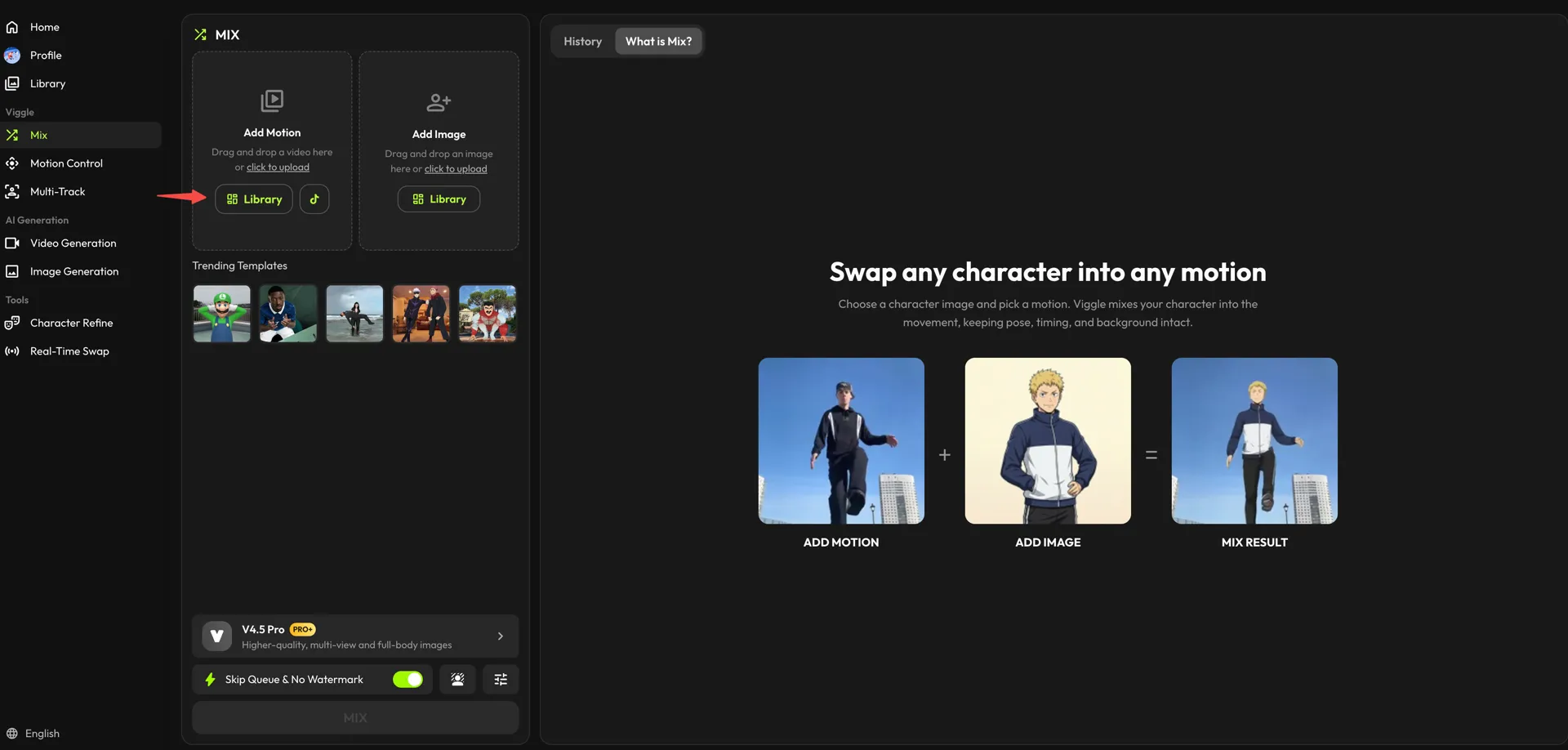
Now, open the "Mix" workspace from the left sidebar.

- In the "Add Motion" card, choose the movement for your meme. Press "Library" to browse the presets — for this example we're going with the "Dance if you" trend — or drag in your own clip and use "click to upload."
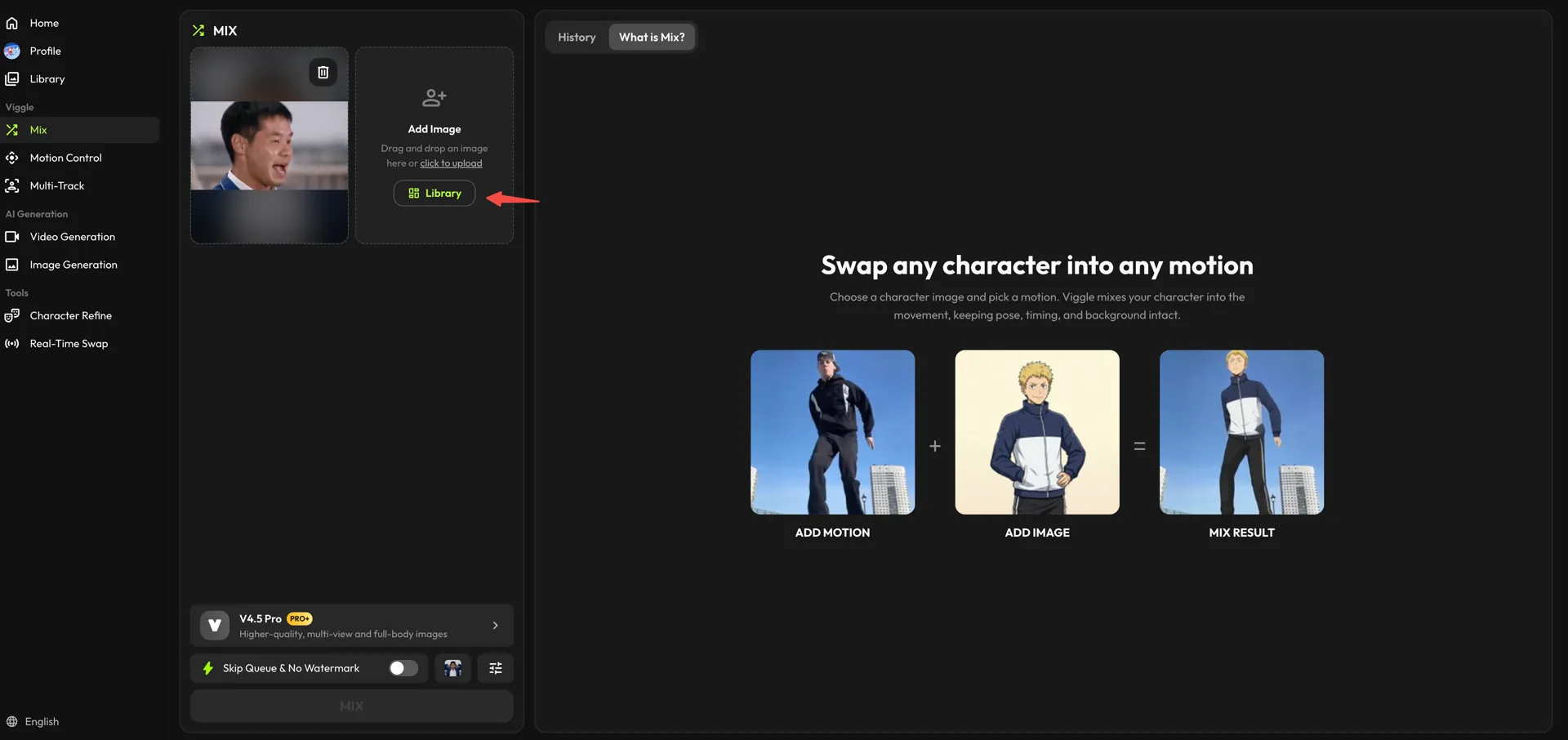
- Repeat the step in the "Add Image" card. Choose a character from the "Library," or upload a photo from your device with "click to upload."
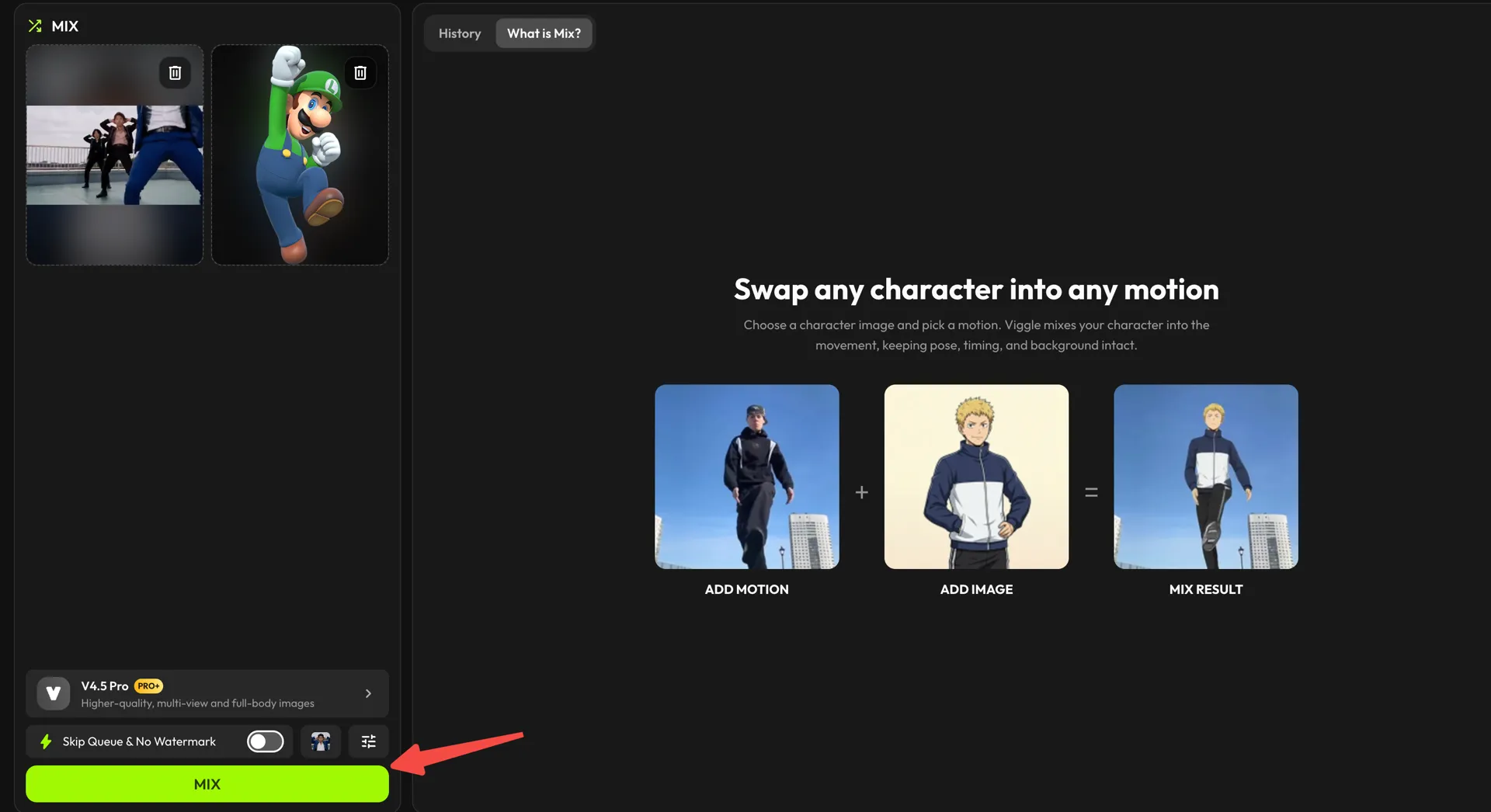
- When you're ready, check the model at the bottom of the panel (V4.5 Pro gives higher-quality, full-body results) and click "MIX" to let Viggle generate your video.
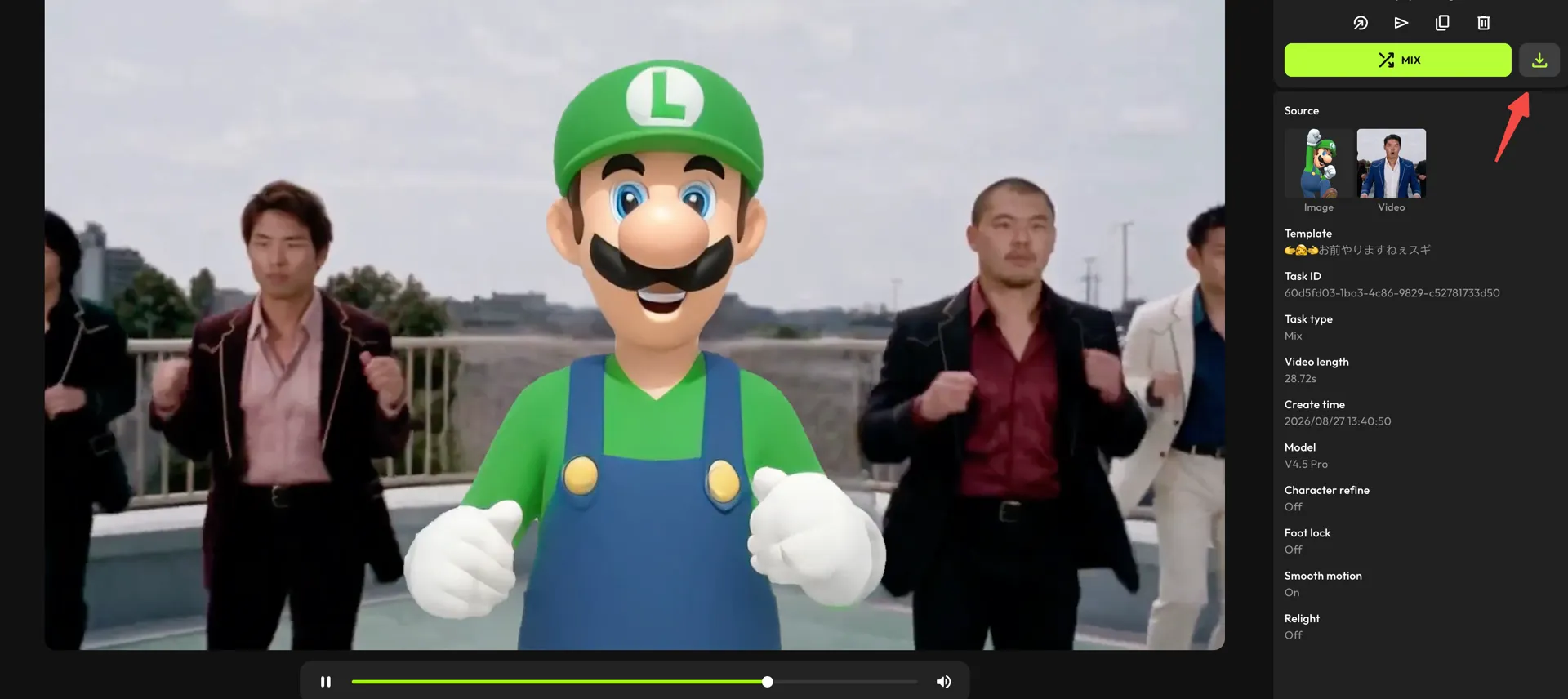
- After the video is ready, click the download icon above the details panel to save it to your device.
Creative Tips for Better Meme-Style AI Videos#
Once you've nailed the balance between humor and realism, the next step is execution. These are simple decisions that make your memes feel smart, not random. Here are 3 proven tips to help you get there:
Add Punchlines At The Right Moment#
A joke only lands if the viewer knows when to laugh. That's why your punchlines should align with motion changes, captions, or beat drops so the humor hits instantly. Here are a few moments where timing really helps the joke click:
| Setup | Punchline Trigger | Why It Works |
|---|---|---|
| Character walking normally | Sudden fall/surprise transition | Breaks expectation |
| Calm expression | Zoom or reaction synced to audio | Comedy in timing + expression |
| Relatable POV caption | Twist reveal in motion | The viewer feels the joke personally |
| Serious build-up | Loop resets unexpectedly | Replay value increases |
Use Relatable Scenarios#
If viewers recognize the situation in one second, half the joke is already delivered. That's how relatability creates connection, which leads to shares and comments. For example, look at this reel:
This works because:
- The Stranger Things Season 5 reference = instant context
- The snacks and binge-watch pose = everyone understands the plan
- The expression matches the caption = emotion + humor synced
Relatable memes like this make people feel seen, and when they feel seen, they share!
Sync With Trending Sounds#
Audio sets the energy. When someone hears a trending sound they already love, they instantly know what kind of joke to expect, and they stick around to see how you use it. That familiarity is what keeps them watching instead of scrolling.
Here's what makes it work:
- Use sounds people already recognize
- Start right at the funniest part of the audio
- Match movement to beats or key punch words
The goal is to make the visual punchline feel like it belongs with the audio so your meme feels like a moment everyone wants to share!
Conclusion#
Balancing humor and realism simply helps people get the joke without getting distracted. When the motion looks believable enough to follow, but exaggerated enough to feel funny, viewers actually stay, they laugh, and they share.
Viggle makes that balance easier for you. You can try different motion styles, test what feels right, and quickly see which version actually makes people react. What matters is that the humor feels intentional and the motion feels right for it. When both click, the video speaks for itself!
FAQs About Humor vs. Realism in AI Meme Videos#
How exaggerated should meme motions be?#
Just enough so the reaction is clear the moment the video starts. If the movements look confusing or take attention away from the joke, they're probably too exaggerated.
Why does my meme video look "too real"?#
That might happen if the funny part comes too late. Try adding a quicker reaction or a motion change earlier so the humor becomes obvious right away.
How do I avoid uncanny facial distortions?#
Keep the face stable and readable first. Let the exaggeration happen more in the body or the movement instead of stretching the facial features.
Can realistic meme videos still go viral?#
Yes, mostly if the twist or reaction is funny enough. As long as the humor arrives clearly and fast, realistic motion can actually make the joke hit harder.
How do I sync emotions with the punchline?#
Hold a normal or straight expression before the joke hits. Then let the reaction change exactly at the funny moment or audio cue.
Should the audio match the motion?#
Yes, but only at the important moments.