How to Create Trending Brainrot Meme Videos With AI Motion Tools
Viggle
How to Create Trending Brainrot Meme Videos With AI Motion Tools#
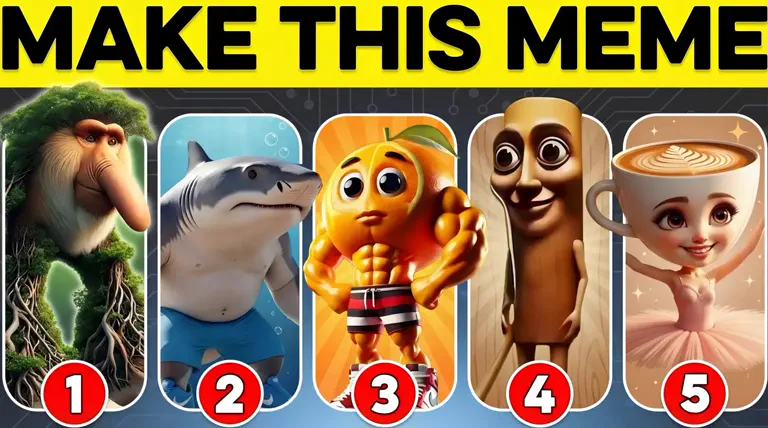
Brainrot memes are those chaotic, overly repetitive jokes that make no sense at first… yet you can't stop watching them. Characters moving in loops, loud punchlines, glitchy zoom-ins, and dramatic music that doesn't match the visuals at all. It's the formula for a viral scroll-stopper.
Basically, the more chaotic the motion, the stronger the "brainrot." That's where Viggle becomes the perfect chaos partner. Instead of spending hours animating silly movements, you can just upload a character and apply wild motion styles instantly, and turn any random idea into a full-blown brainrot moment.
In this blog, we'll break down how you can create addictive brainrot memes using Viggle and what exactly makes people watch them again and again.
So, let's dive in!
What Makes a Video a "Brainrot" Meme?#
Before we move further, let's understand what actually gives a meme that "brainrot" status. There's a very specific formula behind why these videos stick in your head. Brainrot memes are built to overwhelm your brain in the funniest way possible, and these 4 elements are the reason they go viral:
Overstimulating Visuals#
Brainrot memes pack the screen with intense effects using flashing lights, sudden zoom-ins, motion blur, and dramatic overlays. For example, the football-player-style clip here turns a basic pose into a lightning-charged transformation scene.
You can see the impact through the glowing energy, electric sparks, and an overly heroic expression. That visual overload instantly activates the "what is happening??" reaction that defines brainrot.
Repetitive Motions#
Brainrot loves loops. A character doing the same weird move again and again forces the viewer to keep watching and eventually laugh because it's so pointless yet hypnotic. When characters keep doing the SAME exaggerated move while the audio goes crazy…that's peak brainrot energy!
Exaggerated Character Behavior#
Normal reactions don't go viral. Absurd ones do. For example, this reel shows a stern superhero-like character in a Minecraft-inspired world.
Now, this becomes hilarious because he looks serious, but the environment and story context are completely unserious. The mismatch fuels the humor and makes it even more addictive!
Hyperactive Audio#
Chaotic sound drives the joke. This could work as:
- A sped-up meme track
- Unnecessary bass boost
- Overly loud punches or swooshes
- Random viral noises ("skibidi"-style content)
Audio that feels too much for what's happening on screen makes viewers send it to everyone they know.
What Types of Images Work Best for Brainrot Memes?#
Some images are already halfway to becoming brainrot before you even add motion or audio. They're expressive, loud, or just naturally ridiculous, so when they start looping on screen, the chaos level multiplies. Let's break down the kinds of visuals that usually hit hardest in this format.
Anime characters#
Anime characters are built for big emotions. But that's also why they translate so well into brainrot because they look like they're overreacting even when they're just standing there. For instance, this reel shows Makima from Tatsuki Fujimoto's Chainsaw Man casually dancing*.*
The scene makes no logical sense, but visually it's packed with personality. Here are a few more reasons why this works so well:
- Recognizable characters pull in fans instantly and encourage shares
- Serious, story-heavy characters dropped into silly scenarios create a built-in contrast
- The strong outlines and clear expressions keep the chaos readable, even when the motion is extreme
Together, this turns a single anime frame into a tiny, looping story that feels absurd in the best way.
Pets#
Animals don't have to try to be funny. The cat dance trend, for example, shows them in dancing poses. Some stay held up, some. Even before you know the audio, you can tell these clips were made to be replayed.
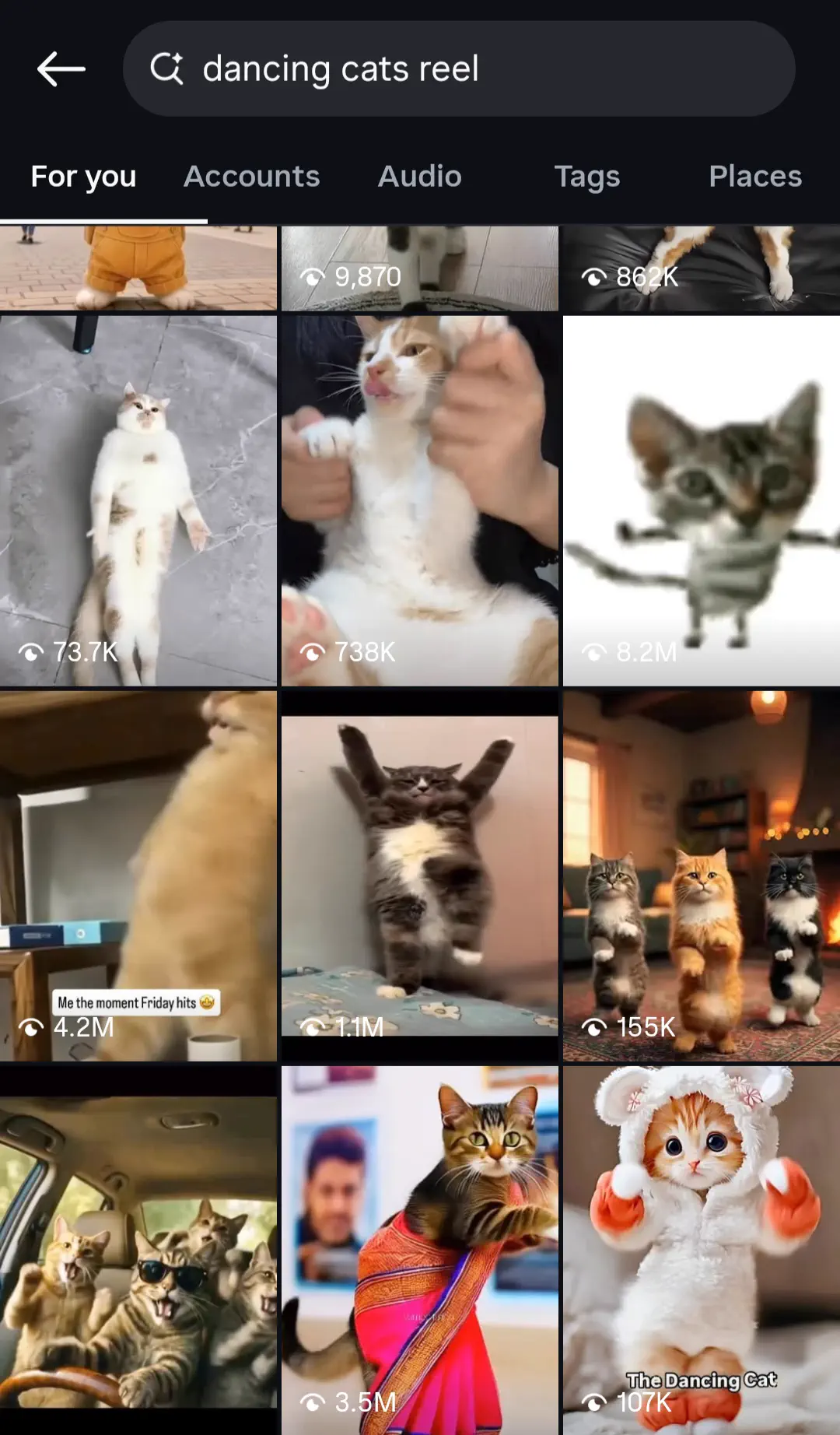
Over time, these pet clips become comfort content. Light, silly, and easy to binge, perfect ingredients for brainrot memes.
Stick Figures#
Stick figures strip everything down to the basics. For example, this stand-up comedy reel from "sticktalkstandup" shows the stick figure on stage with a mic, red curtains, and an audience in front.
This works well because:
- The minimal design makes every gesture look over-the-top
- Viewers focus on the joke and motion instead of the visual details
- It feels like a cartoon version of real life, which matches the surreal tone of brainrot memes
Because of that, stick figures are ideal when you want the humor and movement to be the star of the show.
Reaction Photos#
When a reaction photo loops on screen with loud audio, that expression suddenly feels like it's reacting to EVERYTHING happening in the viewer's life. For example, in these reels, every face is going through something: wide-eyed terror, "I'm fine" denial, clown energy, and emoji laughter.
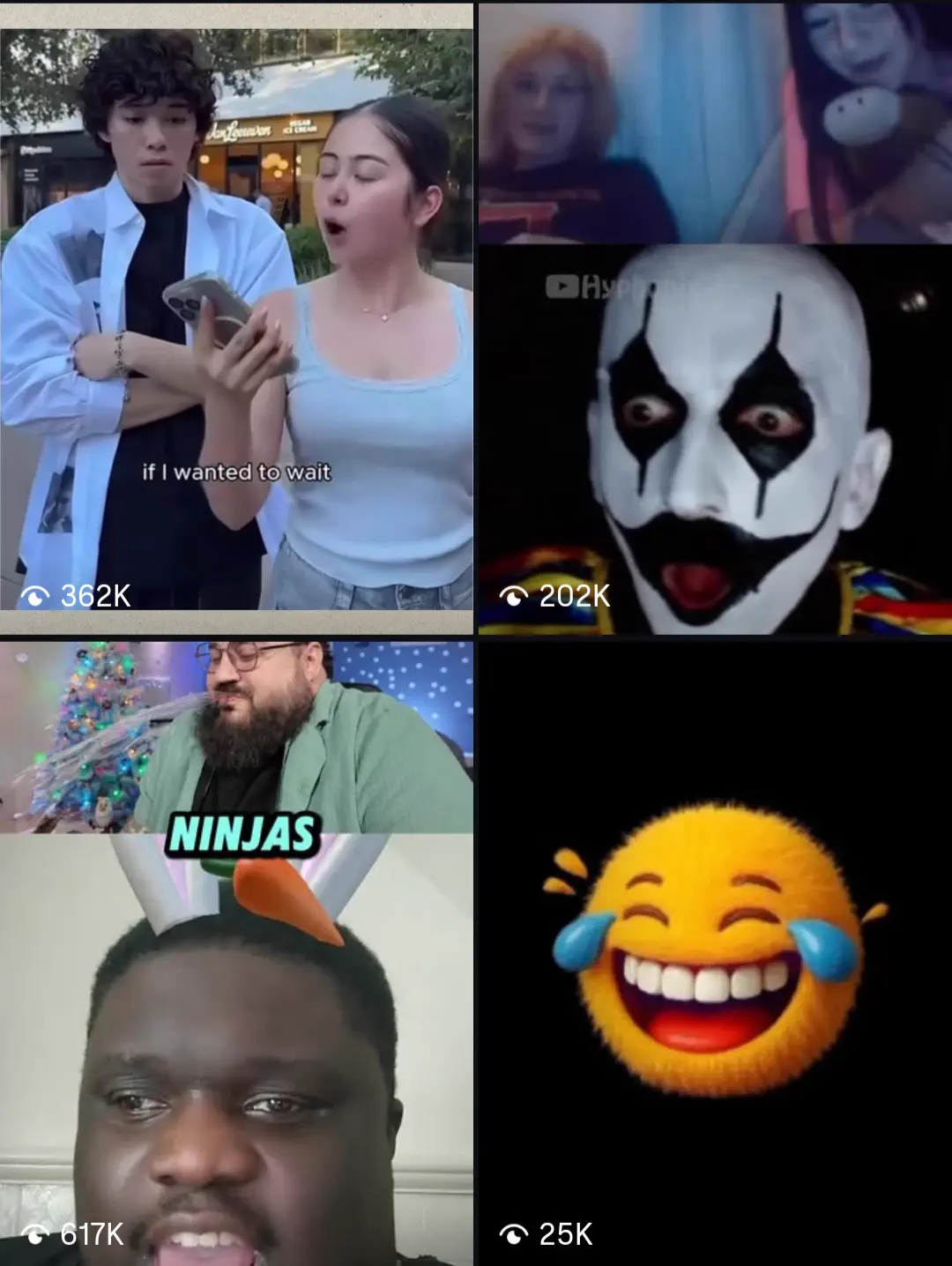
In short: one intense look = endless meme possibilities.
Distorted selfies#
Distorted selfies work well when the face already looks funny or unusual. It can be stretched features, enlarged eyes, or skewed proportions. These images bring built-in comedy value because they look chaotic even before any motion or audio is added. When the expression is already exaggerated, the looping effect gets even funnier and more shareable.
What Motion Styles Are Used in Brainrot Memes?#
Brainrot memes look funny not just because of the character but also the way they move. Let's now look at the specific movements you can use, and how each one helps a simple image turn into a viral, looping brainrot moment.
Shake#
Shake adds instant intensity. When the frame trembles, it looks like the character is reacting too strongly to something very small, which is exactly what makes it funny. It helps because it:
- Keeps the viewer alert
- Makes neutral expressions feel dramatic or panicked
- Works well with sudden beats or loud sounds
Shake quickly turns a normal moment into "why is this so serious?" humor, which is the core of brainrot.
Bounce#
Bounce gives a rhythmic movement that feels playful. Even if the pose is stiff, the bounce makes the character look like they're vibing to the audio. Hence, it becomes the easiest way to turn a still image into something that feels lively and loop-worthy.
Looping Movements#
Repetition is what traps viewers. When nothing changes, your brain keeps waiting, and that wait turns into humor. In fact, this kind of content often pops up in our feed:
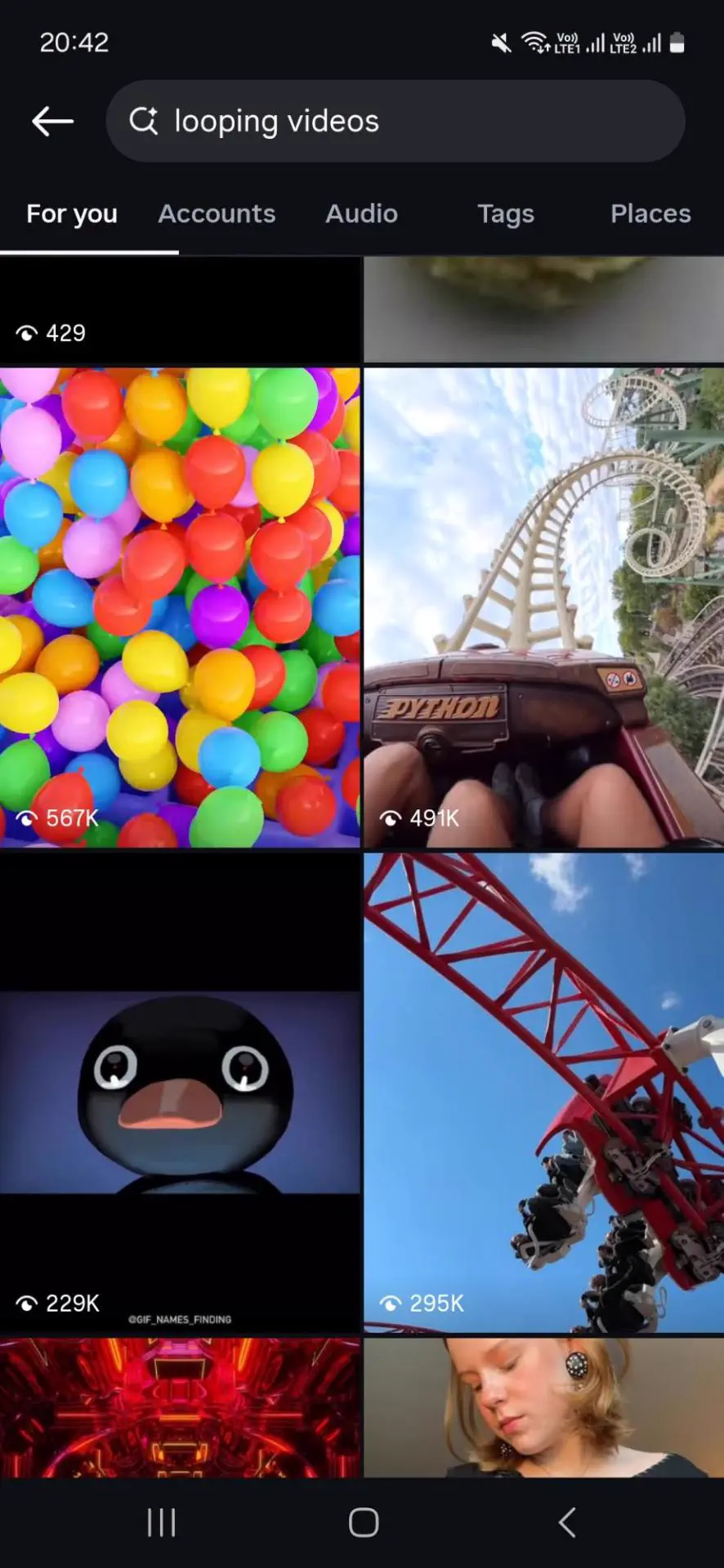
Here's why it stays effective:
- Viewers rewatch to catch tiny details
- The joke escalates simply by continuing
- No narrative needed. Just motion and chaos
Loops are the foundation of brainrot memes because they create a mini "mental glitch" that keeps people stuck watching.
Extreme Facial Zooms#
Zooming in on faces and expressions works because humans are wired to read emotions from facial cues like eyes, mouth, and micro-movements. In brainrot, that means subtle confusion or weirdness becomes loud and meme-worthy.
Jitter Effects#
These effects add micro shakes that make characters look unstable, like they can't control their energy. As a result, this:
- Adds uneasiness that feels intentionally silly
- Makes even calm characters look stressed
- Enhances the "something is off" feeling
All in all, it keeps the motion messy, which is exactly what makes brainrot feel chaotic in a fun way.
How to Use Viggle to Make Brainrot Meme Videos#
Everything we've discussed so far can be created in one place. Viggle gives you the tools to turn simple visuals into brainrot memes that feel loud, funny, and impossible to ignore. Here's a quick step-by-step guide to get started:
- Sign up on Viggle AI with your email address, or hit "Sign In" in the top-right corner if you already have an account.
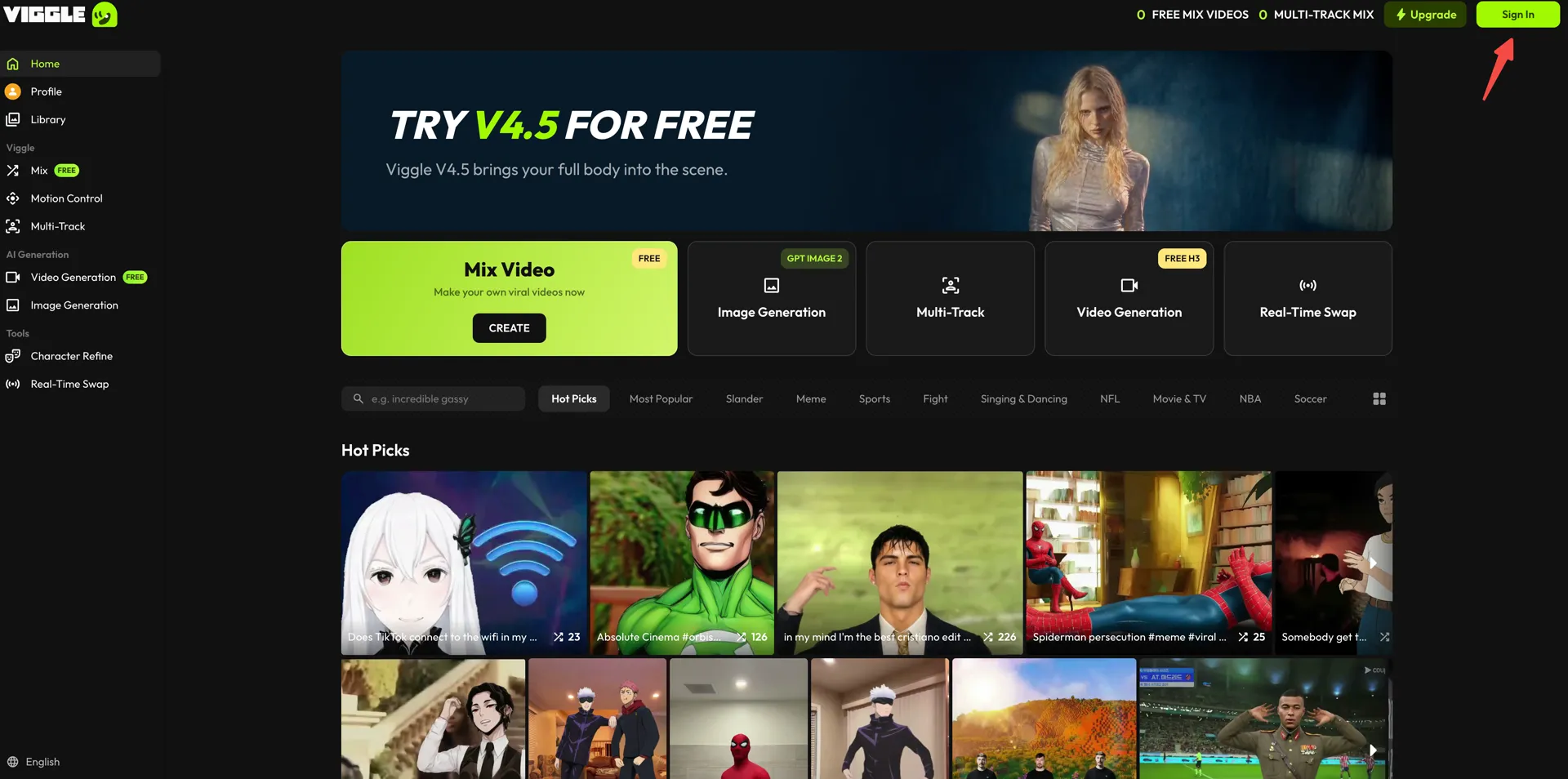
Next, open the "Mix" workspace from the left sidebar.
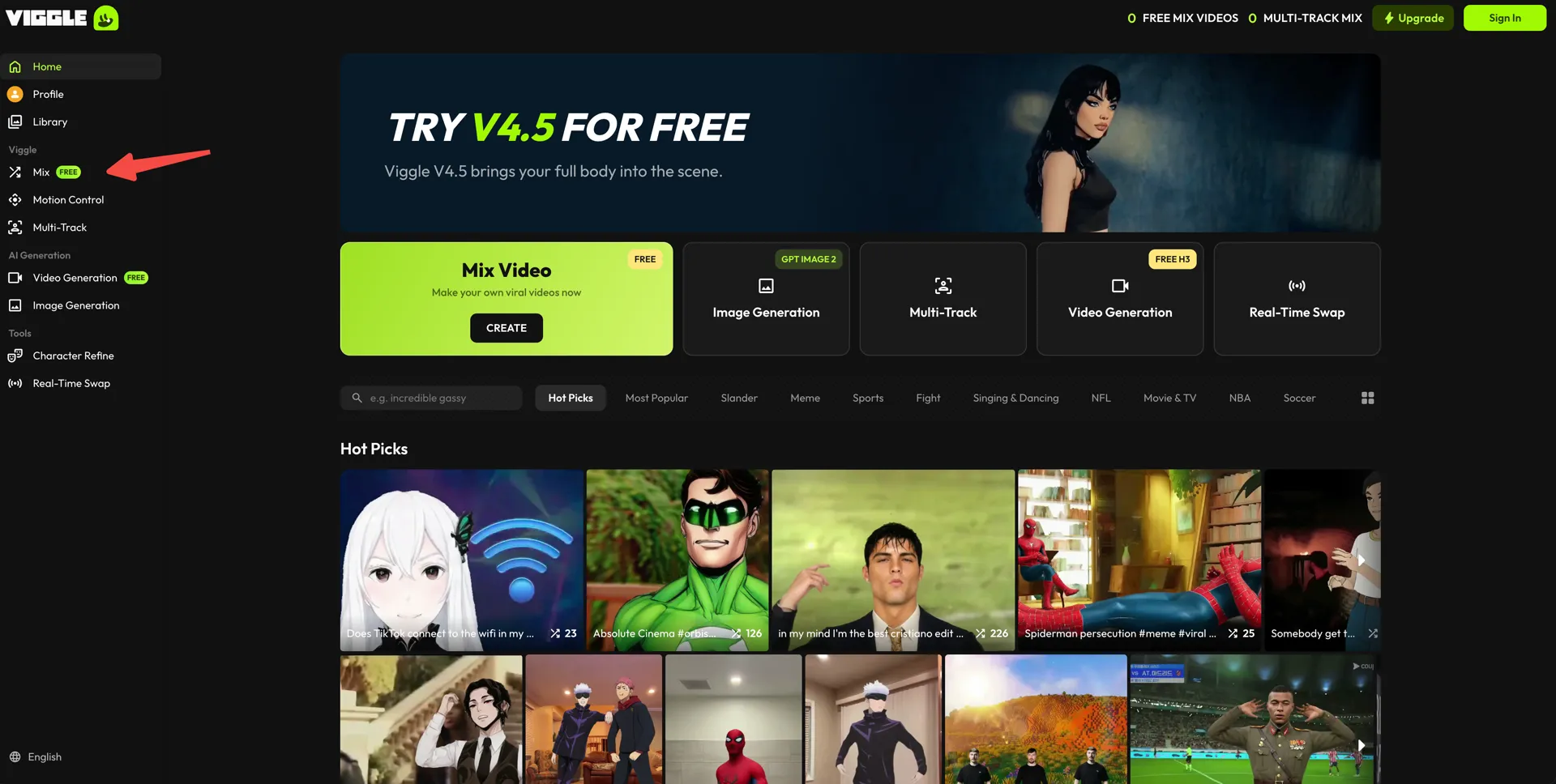
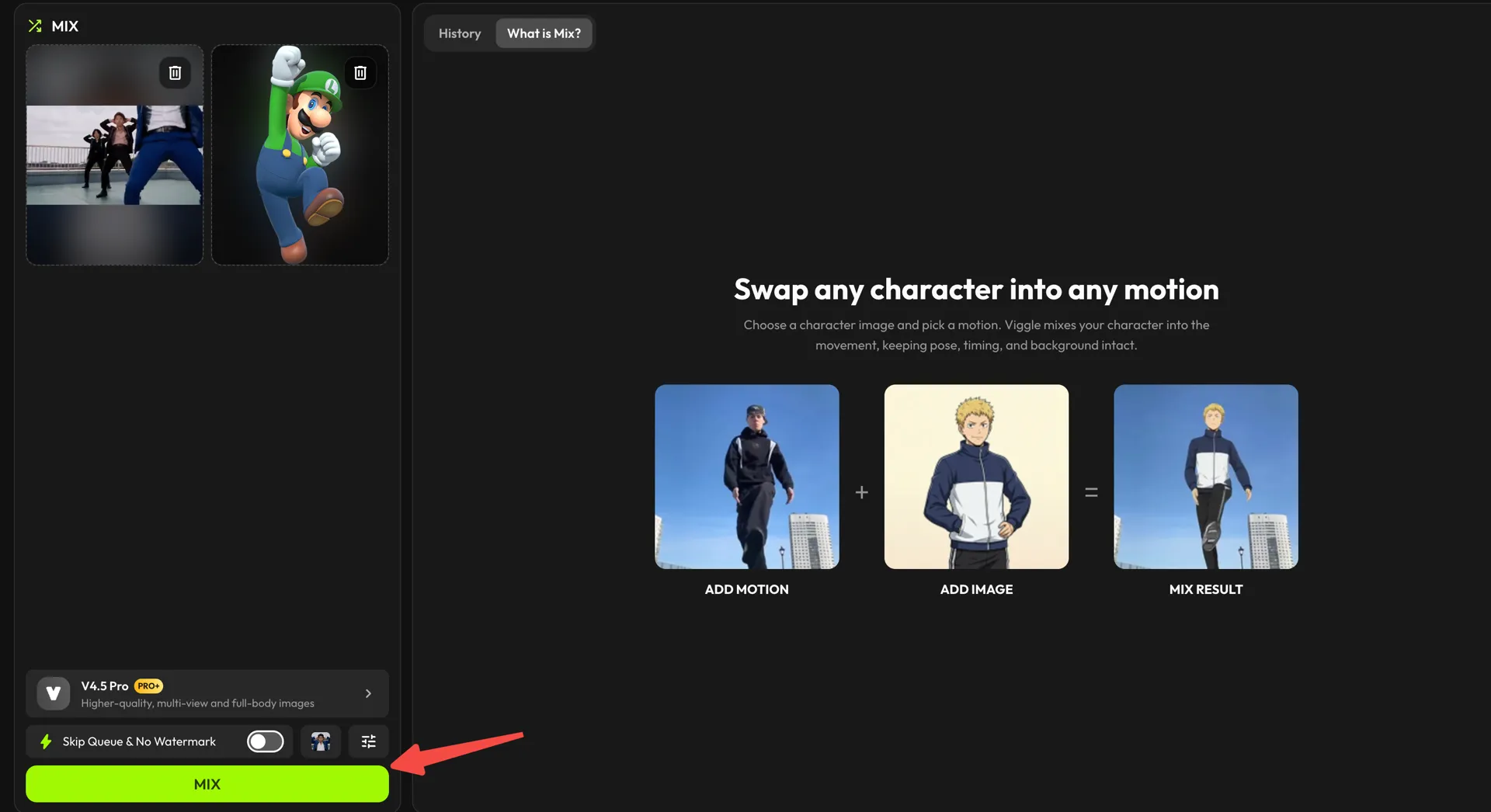
- In the "Add Motion" card, pick the clip that carries the chaos. Drag a video straight in, use "click to upload" for a file from your device, or press "Library" to browse Viggle's presets. There's also a TikTok button next to it if you'd rather pull a trending clip in directly.
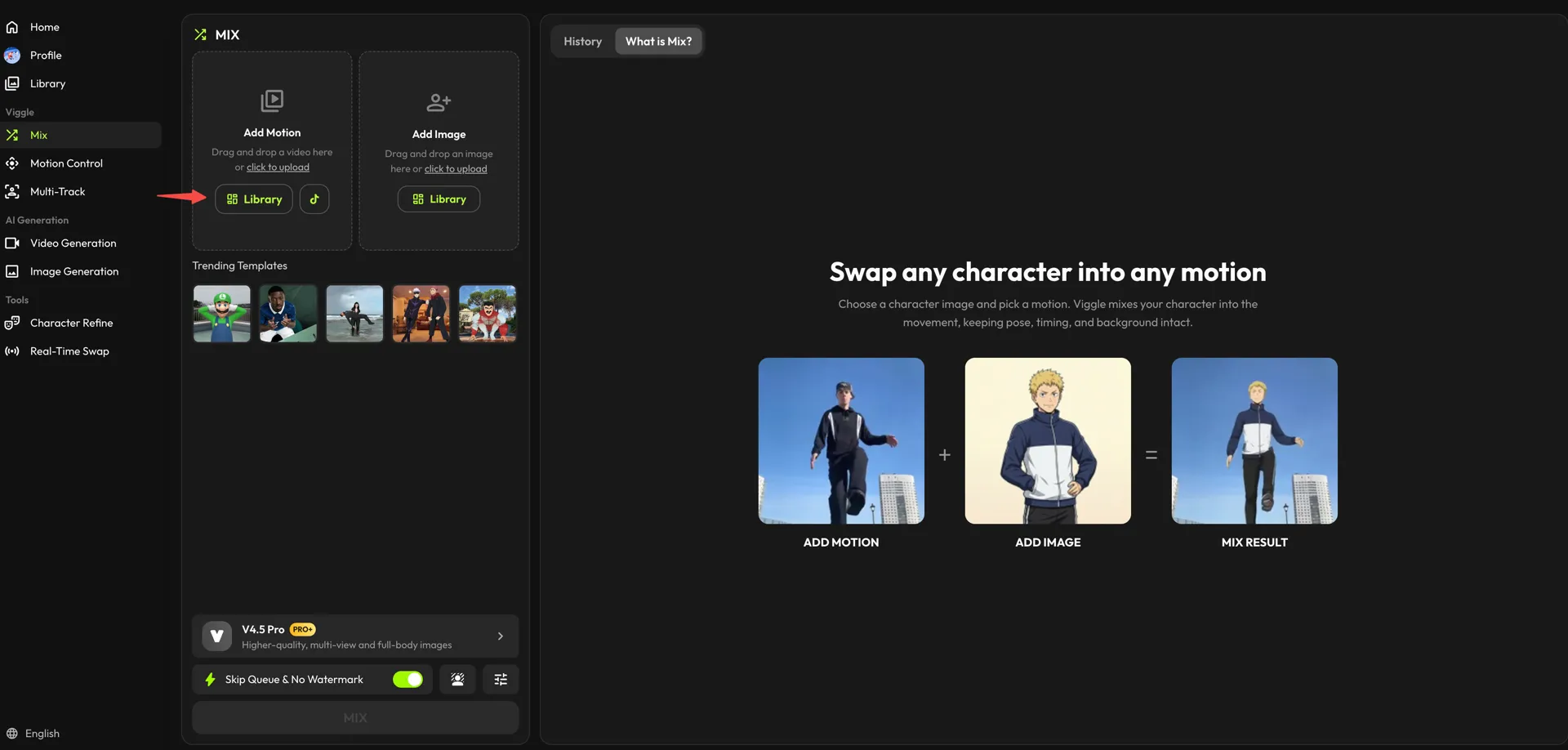
Inside the Library, switch to the "Brainrot" category and choose your motion preset.
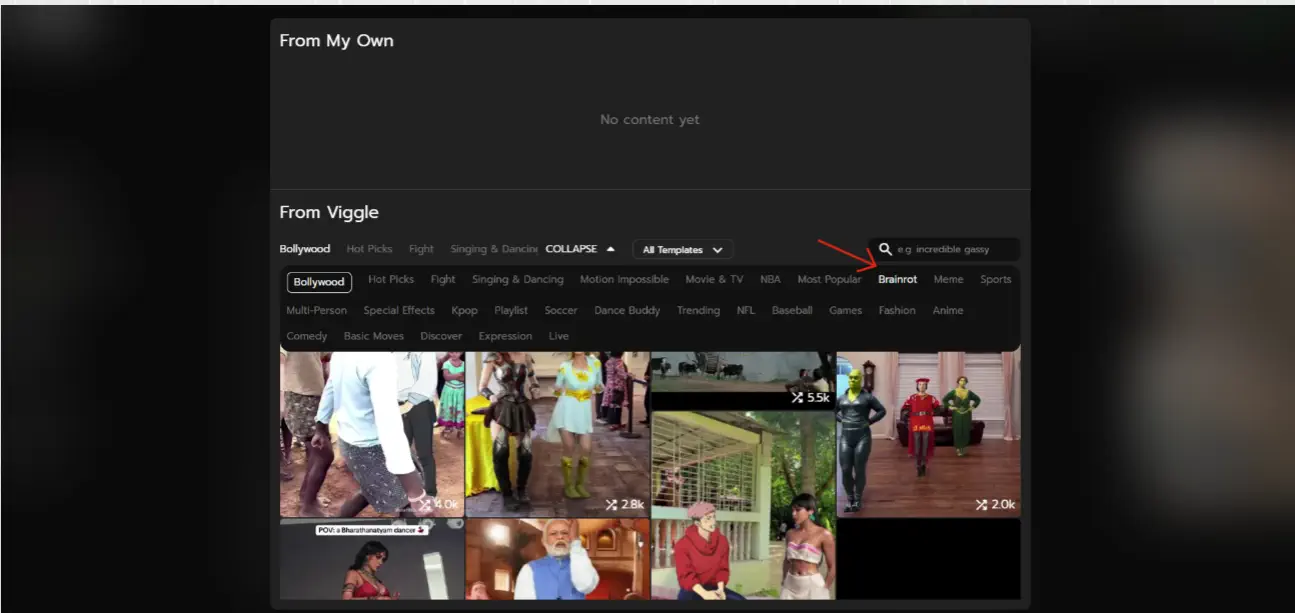
- Now do the same in the "Add Image" card for your character. Pick one from the "Library," or use "click to upload" to bring in your own.
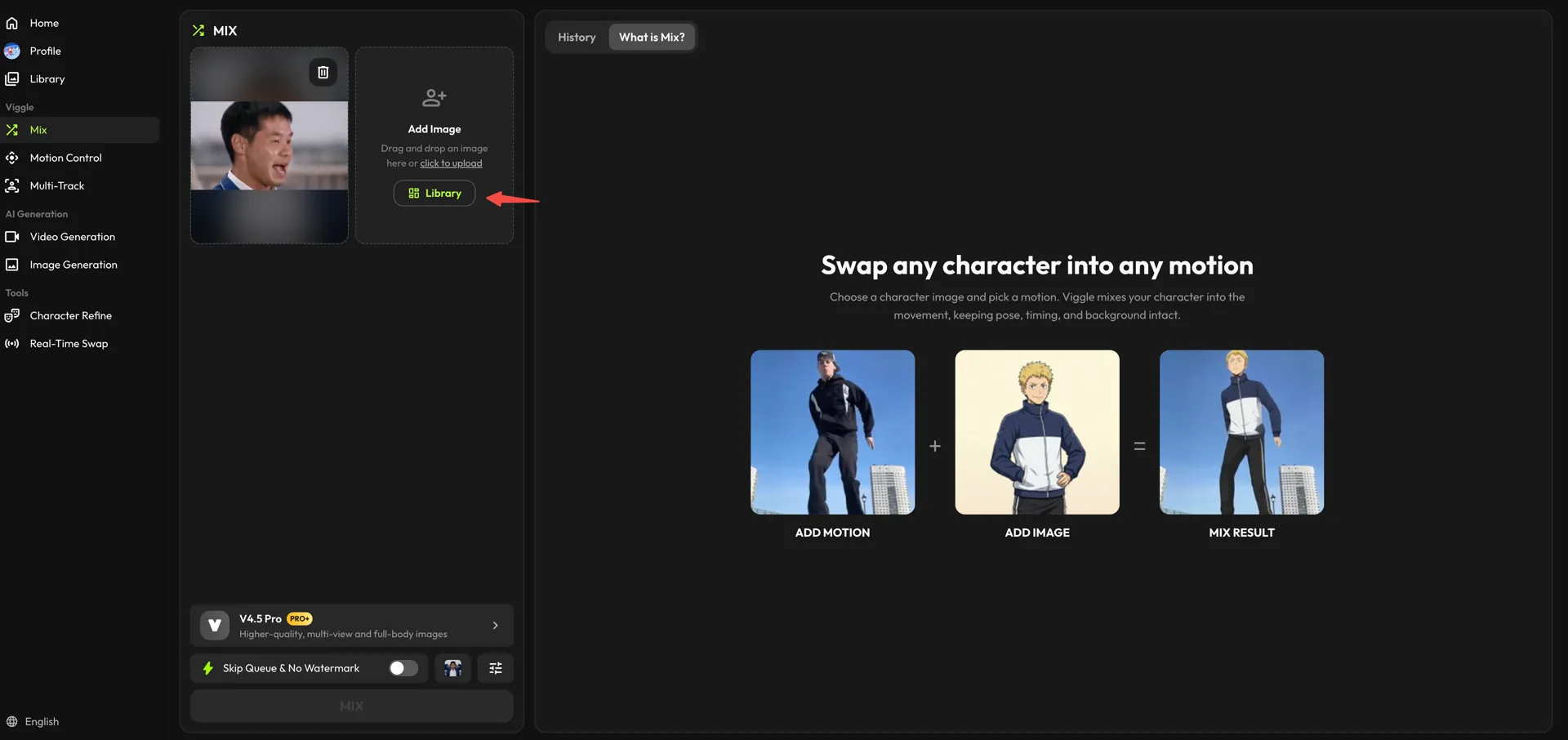
- Check the model at the bottom of the panel (V4.5 Pro gives higher-quality, full-body results), flip on "Skip Queue & No Watermark" if you want a clean export, then click "MIX."
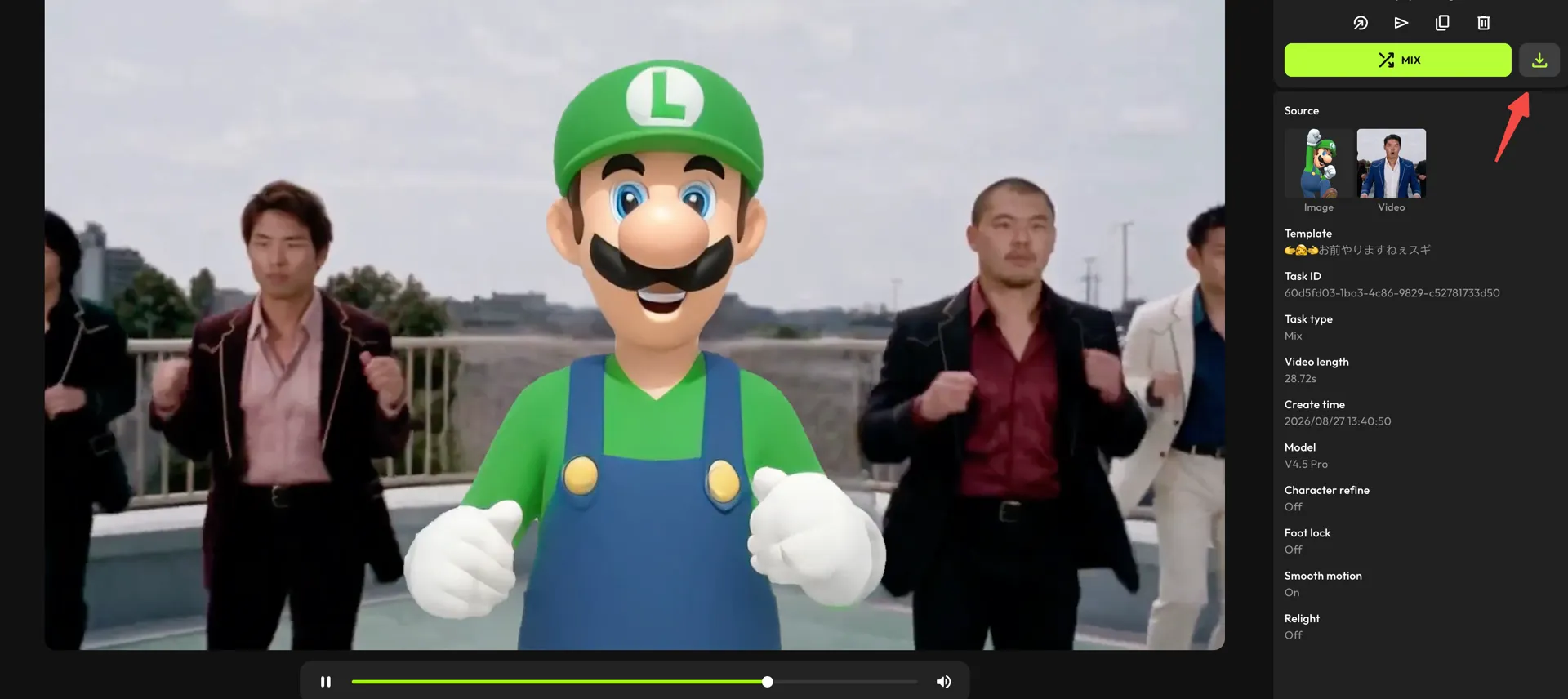
- Once your video is generated, click the download icon above the details panel to save it on your device.
Tips for Making Brainrot Videos Actually Go Viral#
If you're producing brainrot content for the first time, it might seem like "just show some chaos on screen." But the truth is: only the right kind of chaos works. Here are some simple tips to help:
Use Trending Sounds#
Trending audio does half the distribution for you. If the viewer already recognizes the sound, they're more likely to watch the whole thing and share it because it fits the current meme wave. Here's what to keep in mind:
| What to Do ✅ | What to Avoid ❌ |
|---|---|
| Choose sounds that are already popular on Reels/TikTok | Using audio that nobody recognizes |
| Start the sound right at the chaotic/funny moment | Long intros where nothing happens |
| Pick loud, fast, or exaggerated meme sounds | Calm or slow music that doesn't fit brainrot energy |
| Keep the video short so the loop hits the beat again | Extending the clip past the best part of the audio |
Make It Overstimulating#
Brainrot works when the viewer feels like the screen is yelling at them. Add something that makes the clip feel visually louder. Here are some easy ways to do that:
- Use sudden zooms or quick shakes
- Bright colors / fast movement transitions
- Random but funny text overlays
The point is not to give the brain a break, and that's the whole point.
Super-Short Duration#
The shorter the clip, the more times people unconsciously rewatch it. Even 15-30 seconds is enough if the motion style is engaging. All in all, short video = long viewer retention.
Loop Perfectly#
A clean loop makes the video feel like it never ends, and viewers stay stuck, wondering where the clip began. So, make sure your videos play in a loop with no hard cuts at the end, and the motion looks continuous, not like a reset.
Conclusion#
If you've made it this far, you already know what it takes: a funny image, the right movement style, and audio that brings the chaos alive. But for that, you don't need advanced editing skills or hours of effort. With Viggle AI, it's way easier to turn a simple idea into something people actually share.
So start experimenting. Pick a character. Add motion. Sync it with a sound everyone's obsessed with right now. Brainrot rewards creators who aren't afraid to be weird, and your next 3-second loop could be the one that gets stuck in someone's head all day.
FAQs About Brainrot Meme Videos#
1. Why are brainrot memes so addictive?#
Because they don't give your brain a break. They're short, chaotic, and loop perfectly, which is why you end up watching again just to figure out what's going on.
2. How do I create jitter loops?#
To do that, keep the movement tiny and fast, like the character is glitching or can't stand still. When that loop keeps repeating with loud audio, it instantly feels more funny and chaotic.
3. Can I use photos of pets or friends?#
Of course. Pets and friends actually work better sometimes because real faces and funny expressions feel more relatable. Just make sure you have their valid consent for the same.
4. Do brainrot videos need specific dimensions?#
Not really, but vertical usually works well. 9:16 fills the whole screen on TikTok, Reels, and Shorts, so the chaos hits harder.
5. Which platforms support brainrot memes?#
Mostly, it works on TikTok, Instagram Reels, and YouTube Shorts.
6. Is there a legal risk to using public character images?#
A little, yes. If it's a famous character, technically, the rights belong to someone. Most people still post for fun, but if it's for brand or commercial use, stick ONLY to characters you're allowed to use.