How to Create Viral Meme Videos From a Single Image
Viggle
How to Create Viral Meme Videos From a Single Image#
Static memes are funny, but meme videos are funnier. They capture attention longer, get more shares, and trigger more reactions because movement instantly makes the joke bigger, louder, and far more unexpected.
Thanks to AI, you no longer need editing skills to create these on your own. Modern motion models can take a single image and give it expressions and movement that perfectly deliver the punchline.
This is where Viggle stands out by turning static images into short, motion-packed meme videos in seconds. In this blog, you’ll learn how to create those viral meme videos by using Viggle and optimize them for TikTok, Reels, and Shorts.
So, ready to make memes that move people, literally? Let’s dive in.
What Makes Meme Videos Go Viral?#
Not every meme hits the algorithm jackpot. But the ones that do usually have a mix of humor, relatability, and something familiar. Here’s what really drives those viral numbers:
Humor#
People share what makes them laugh because it gives them social currency: “This is so funny, you HAVE to see this.” To see how this plays out in motion, look at this example featuring Mark Andrews transformed into a hilarious electric-charged moment.
All in all, the quicker the laugh, the quicker the share, and that’s how humor drives reach.
Relatability#
Viral memes often describe a feeling people already have but have not put into words. When viewers think “this is exactly me”, they automatically tag friends and comment. Here’s a perfect example showing the Welcome Week, knowing these friendships won’t survive till graduation.
If a meme reflects reality, the audience naturally turns into promoters.
Short Format#
Viral meme videos respect how people actually scroll. They are short enough to finish before attention drops, and tight enough that viewers naturally rewatch them. This Roblox situation reel is a good example as it delivers the setup and punchline quickly, then gets out of the way.
Classic simple formula: Short + funny = unstoppable.
Remixability#
A meme becomes a trend when people can recreate it. This Gojo & Geto edit, for instance, works on the same notion that has already been reused with different captions and scenarios.
When a meme is easy to remix, it stops being just a video and becomes a template the community can play with!
Template Familiarity#
Some meme videos blow up because the visual format is already familiar. When viewers recognise the reference, they understand half the joke before anything even happens. For example, in this reel, Taylor Swift and Travis Kelce are animated in a frame that clearly mirrors the iconic “La La Land” style, right down to the pose and backdrop.
Familiar templates work because they save time. The audience does not need setup, so the meme can go straight to the twist.
What Type of Images Work Best for Meme Videos?#
Some visuals are already halfway to becoming a meme because their emotion or personality jumps right off the screen. So, when AI adds a bit of motion, they go from funny… to unstoppably share-worthy. Let’s look at some categories that usually work well.
Reaction Faces#
If a single look can sum up an entire feeling people have thousands of times a day, that’s a reaction meme. These images spread fast because people see themselves in that expression. The iconic Chloe Clem “Disneyland side-eye” meme is the best example of this category.
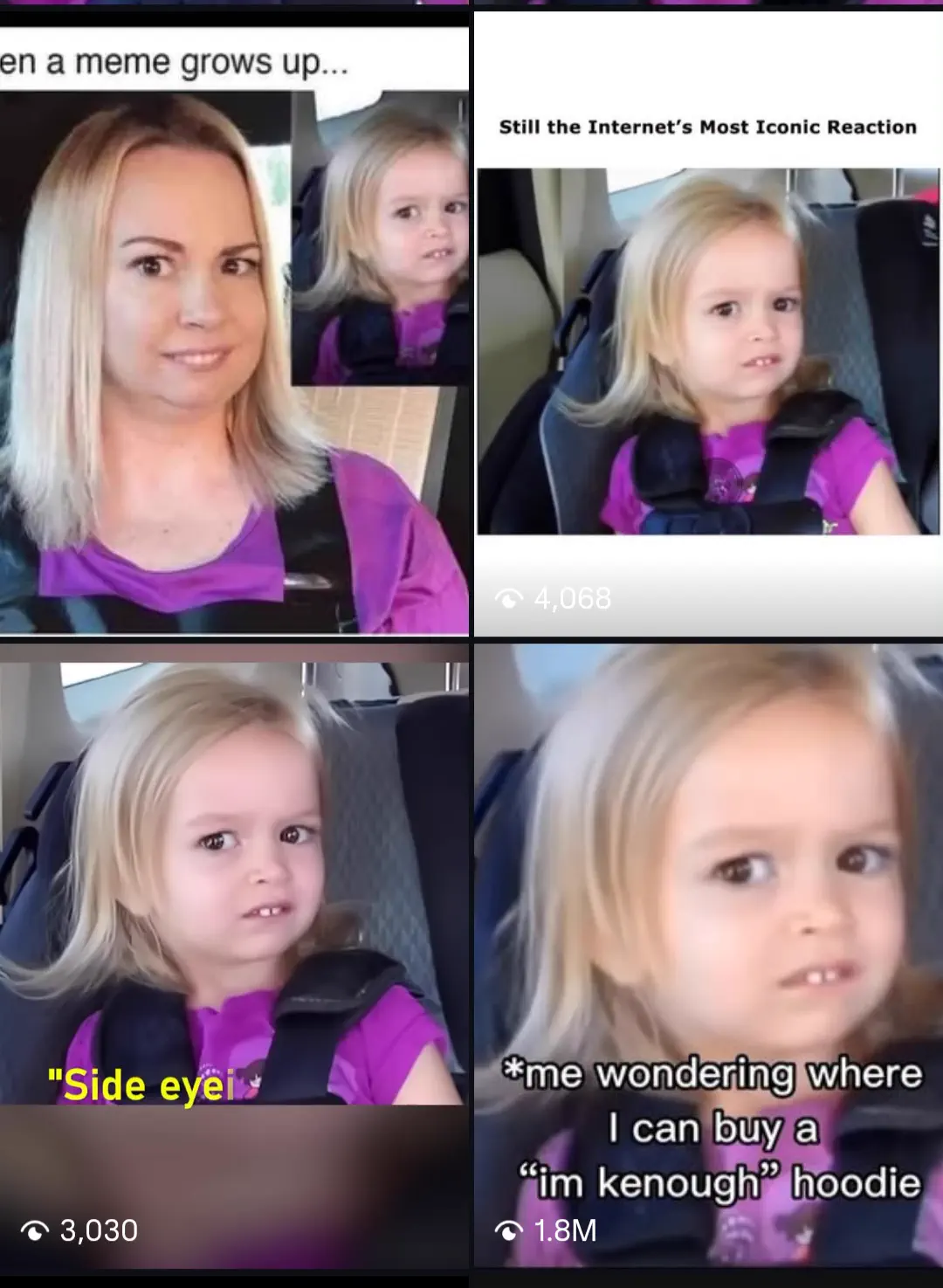
This meme blew up because:
- Everyone has given this exact “I’m trying not to judge, but I am” look
- The confusion + annoyance mix is universally funny
When AI adds subtle motion, it doesn’t change the joke but rather escalates it. That’s why what was once a freeze-frame becomes a full performance.
Pets#
Animals don’t even try to be funny, and that’s exactly what makes them gold for meme content. When pets react dramatically or dance awkwardly, audiences instantly connect. The recent viral husky dance trend sits perfectly well in this category.
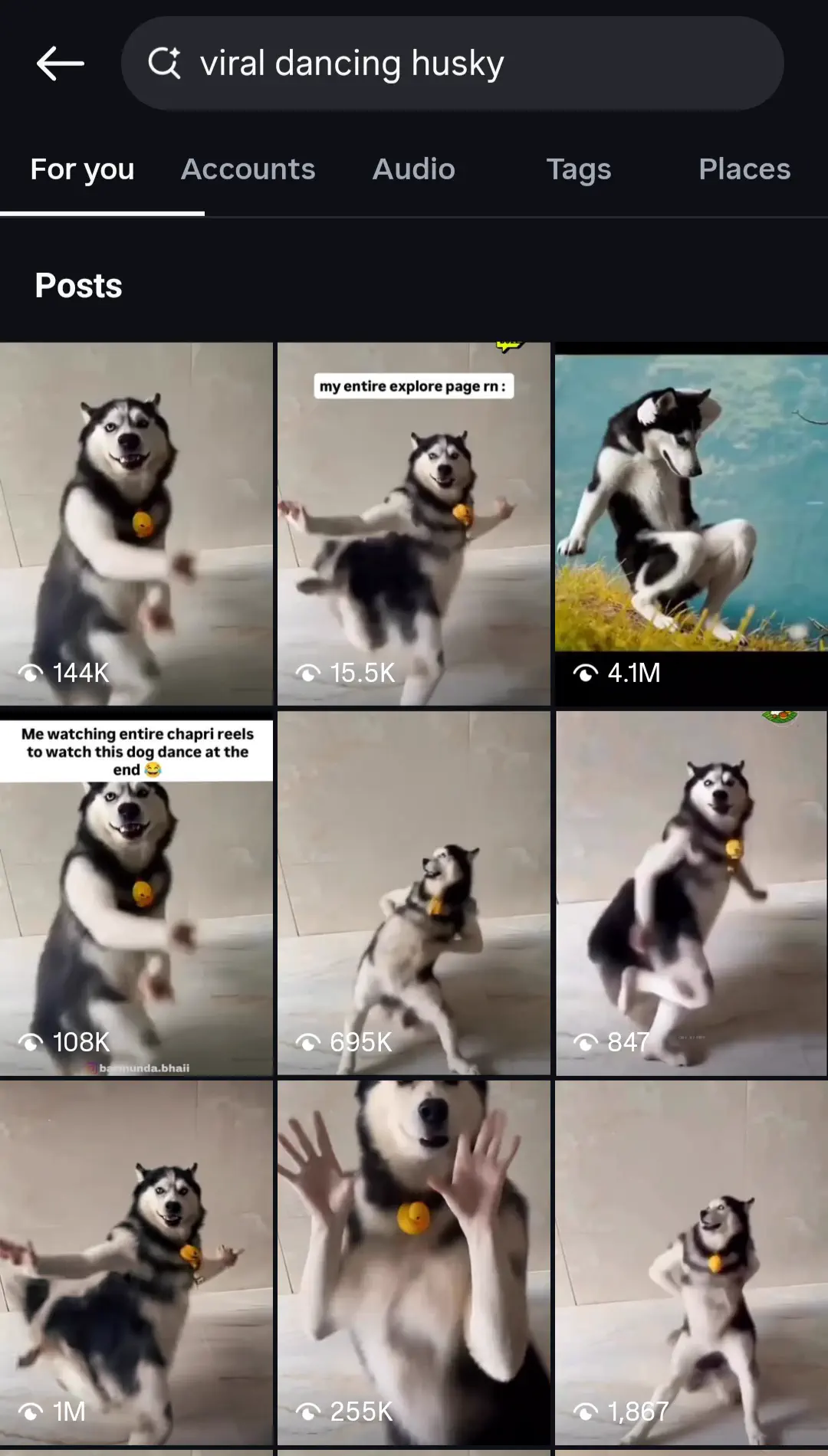
This worked so well mainly because:
- Innocent expressions paired with human-like behavior create strong comedy
- No complicated context needed for people to enjoy it
Eventually, pet images create memes that feel lighthearted and universally shareable, which naturally makes them a strong category for motion memes.
Characters#
Another category that consistently performs well is iconic characters, especially those known for being overly serious. For example, this reel featuring Eren, Mikasa, and Levi from Attack on Titan is a perfect case here.
Here are two main reasons why this example lands perfectly as a motion meme:
- Fans instantly recognize the characters, which leads to faster likes, shares, and tags.
- Clear outfits and silhouettes help AI animate them without any confusion.
These surprise elements drive both engagement and replay value.
Pop Culture Frames#
Pop-culture frames also thrive as meme videos because viewers already know the original scene. The Squid Game doll in this reel, for example, symbolizes tension and danger, so when it randomly appears dancing or doing “aura farming,” the joke hits immediately.
Here’s why this format works so well:
- Works beautifully with dramatic audios or unexpected punchlines
- Great for cross-culture meme remixes (K-pop, Bollywood, TikTok audios, etc.)
Hence, seeing that same doll casually grooving creates a perfect, absurd contrast that viewers love sharing.
Clean Backgrounds#
Clean backgrounds might sound like a technical detail, but they make a huge difference in how smooth and real the motion looks. This means fewer glitches and better comedic delivery. “The Invincible” characters in this reel show exactly how well this works.
This example is ideal for animated meme content because:
- It’s easier to add captions without overlapping important areas
- The background doesn’t distract from the joke
And of course, a clear subject lets the humor shine. However, the joke should come from the motion and not from viewers squinting to understand what’s happening.
How Does AI Turn a Still Image Into a Meme Video?#
When a single static image suddenly starts dancing, reacting, and shaking like it’s alive, it feels like pure magic. But behind the scenes, AI is doing a clever mix of motion science and meme logic to make every laugh land perfectly. Here’s how it works:
Keyframe Extraction#
The very first thing AI does is treat your image like a puppet that needs joints. So it breaks the image into key movable areas:
- Face map: Eyes, mouth, eyebrows (for reactions)
- Head + neck: Where the head turns should come from
- Torso + shoulders: Slight bounces, shrugs
- Hands (if visible): Small gestures or sync with beats
These become anchor points and once the keyframes are locked, AI builds mini “transition frames” in between, so the motion doesn’t glitch, stretch, or break the character. That’s how a still face keeps its personality across every shake or reaction.
Wave, Bounce, Shake, Expression-Based Motions#
During motion transfer, AI applies popular meme-style motions, and then syncs those with facial expressions for comedic timing. Here’s how expression-based motions work:
| Expression Trigger | Motion Style Applied | Why It’s Funny in Memes |
|---|---|---|
| Raised eyebrows | Sudden head pop or zoom-in | Emphasizes shock/confusion instantly |
| Side-eye | Slow face turn + subtle body shift | Builds awkward judgment humour |
| Big smile | Bouncy loop | Mimics over-eager reactions and cringe joy |
| Angry frown | Shake effect + jitter | Amplifies frustration in ridiculous ways |
When reactions are this exaggerated, viewers understand the joke even without captions.
Text-to-Motion Meme Styles#
One of the coolest parts? You can type something like:
“awkward side-eye while sitting still” “confident power stance shake” “happy zoom-in dance”
…and the AI automatically chooses the motion that best matches that vibe. In fact, this is how creators crank out memes fast.
No acting. No recording. No manual keyframing.
Just a photo + a silly prompt and you can get instant reaction content.
How to Use Viggle to Create Meme Videos From a Single Image#
Now that you know which images naturally turn into viral memes, let’s see how to turn them into moving memes with Viggle. Here’s a step-by-step guide:
- Sign up on Viggle AI with your email address, or click “Sign In” in the top-right corner if you already have an account.
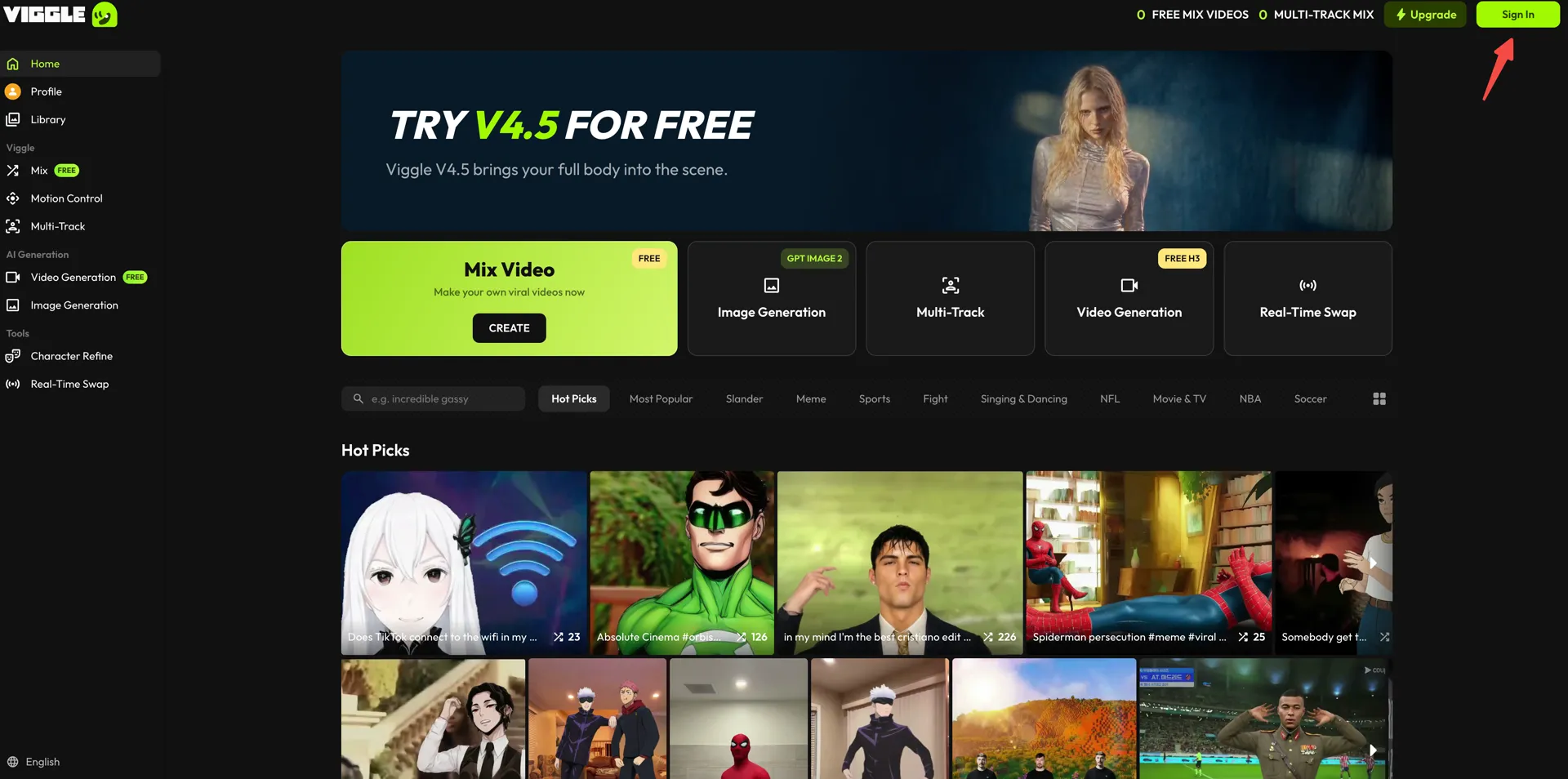
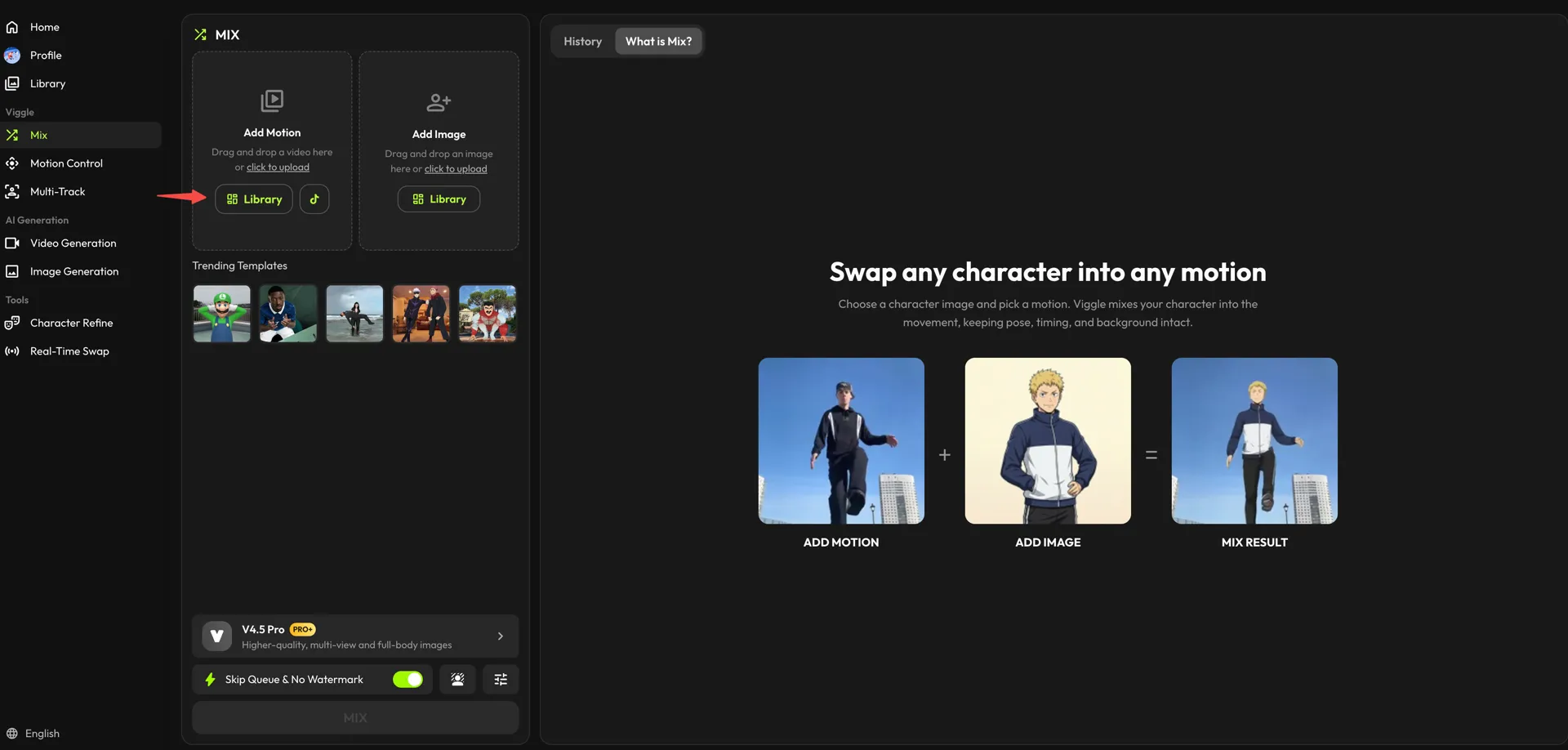
Next, open the “Mix” workspace from the left sidebar.
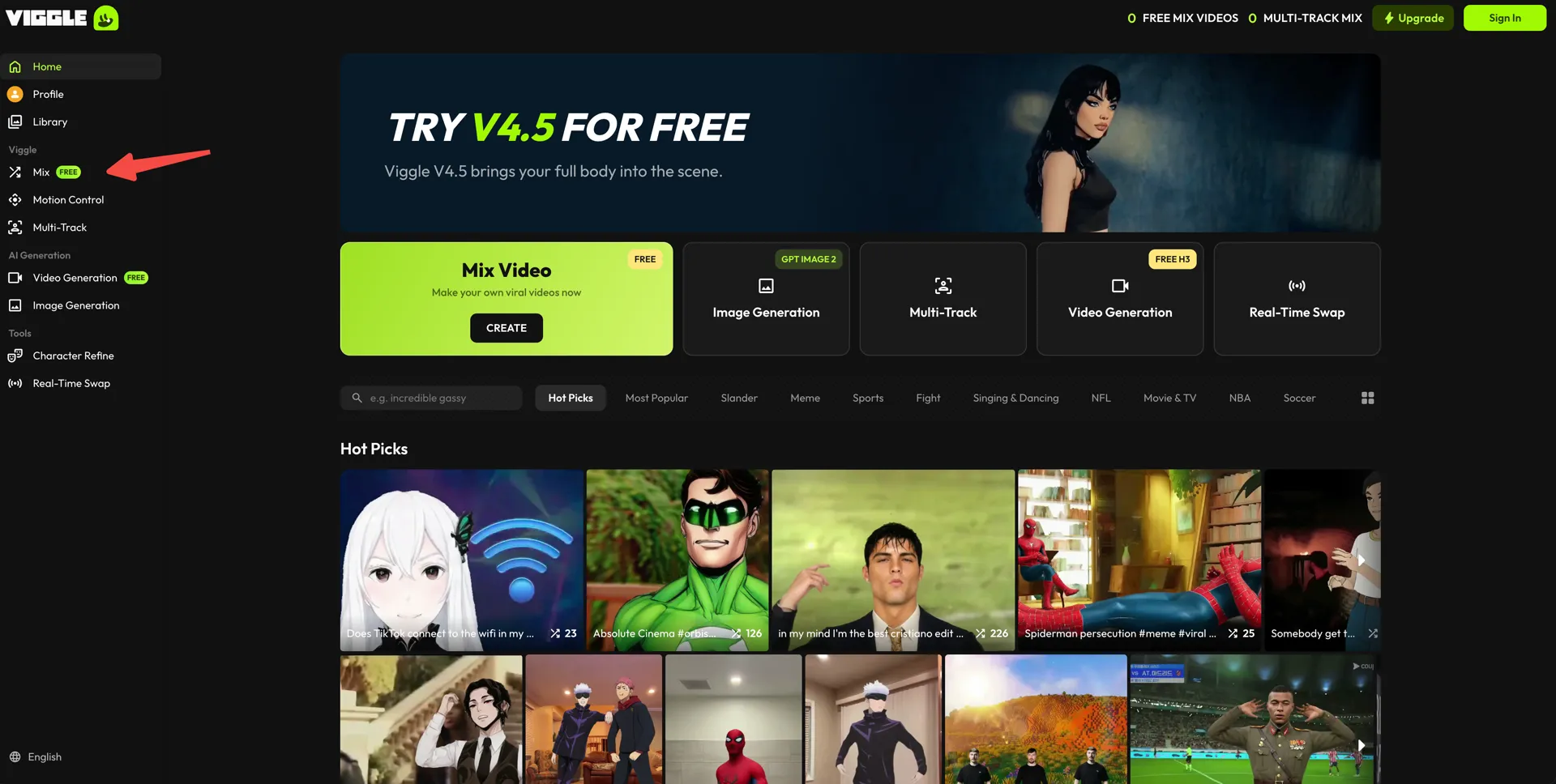
- In the “Add Motion” card, choose the movement for your meme. Press “Library” to browse Viggle’s presets, which are organised under sections like “Meme” and “Brainrot” — especially useful for short, punchy meme videos. To use your own clip, drag it in or use “click to upload,” and the TikTok button next to it pulls one straight from the app.
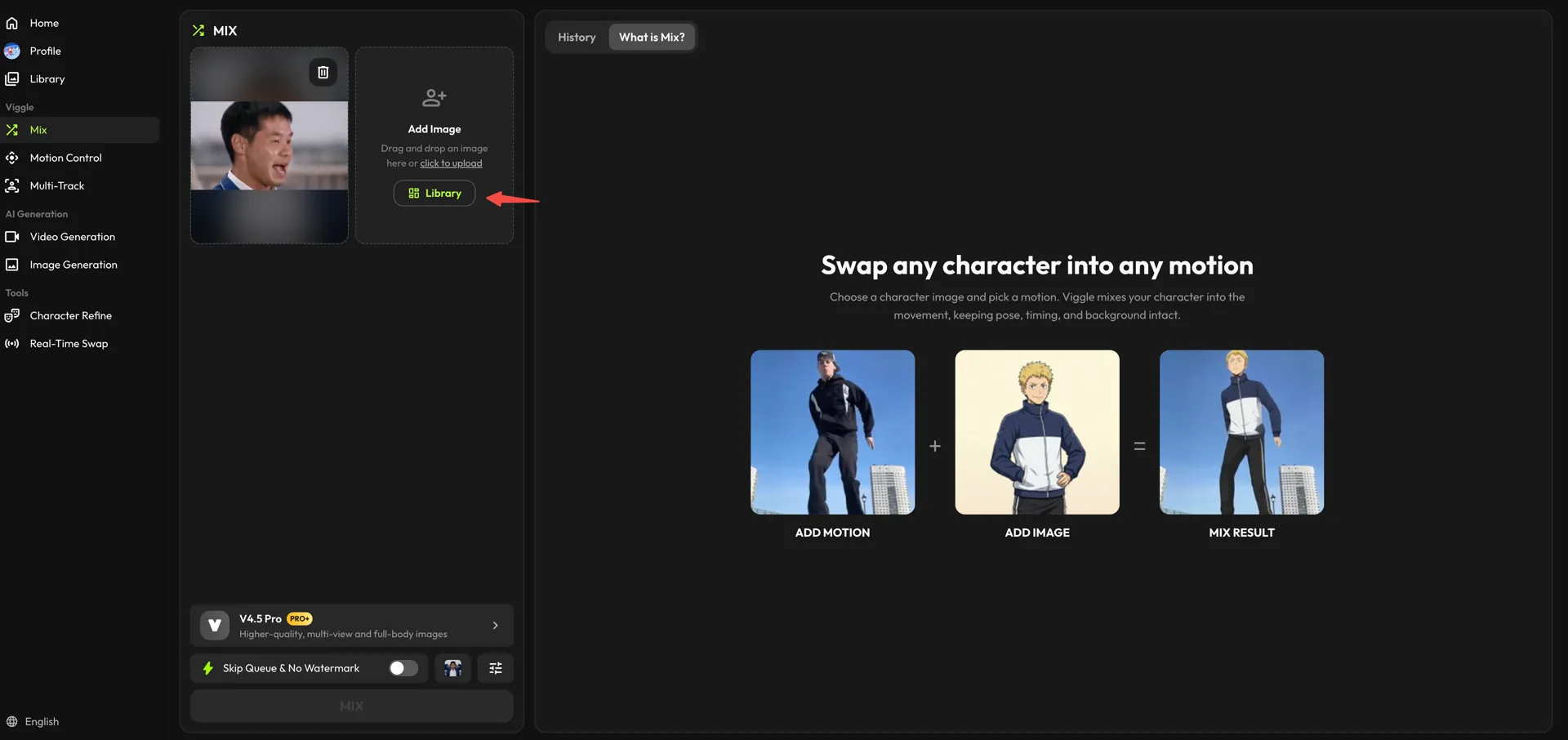
- Now repeat the same step in the “Add Image” card for your photo. Pick a character from the “Library,” or drop your own image in with “click to upload.”
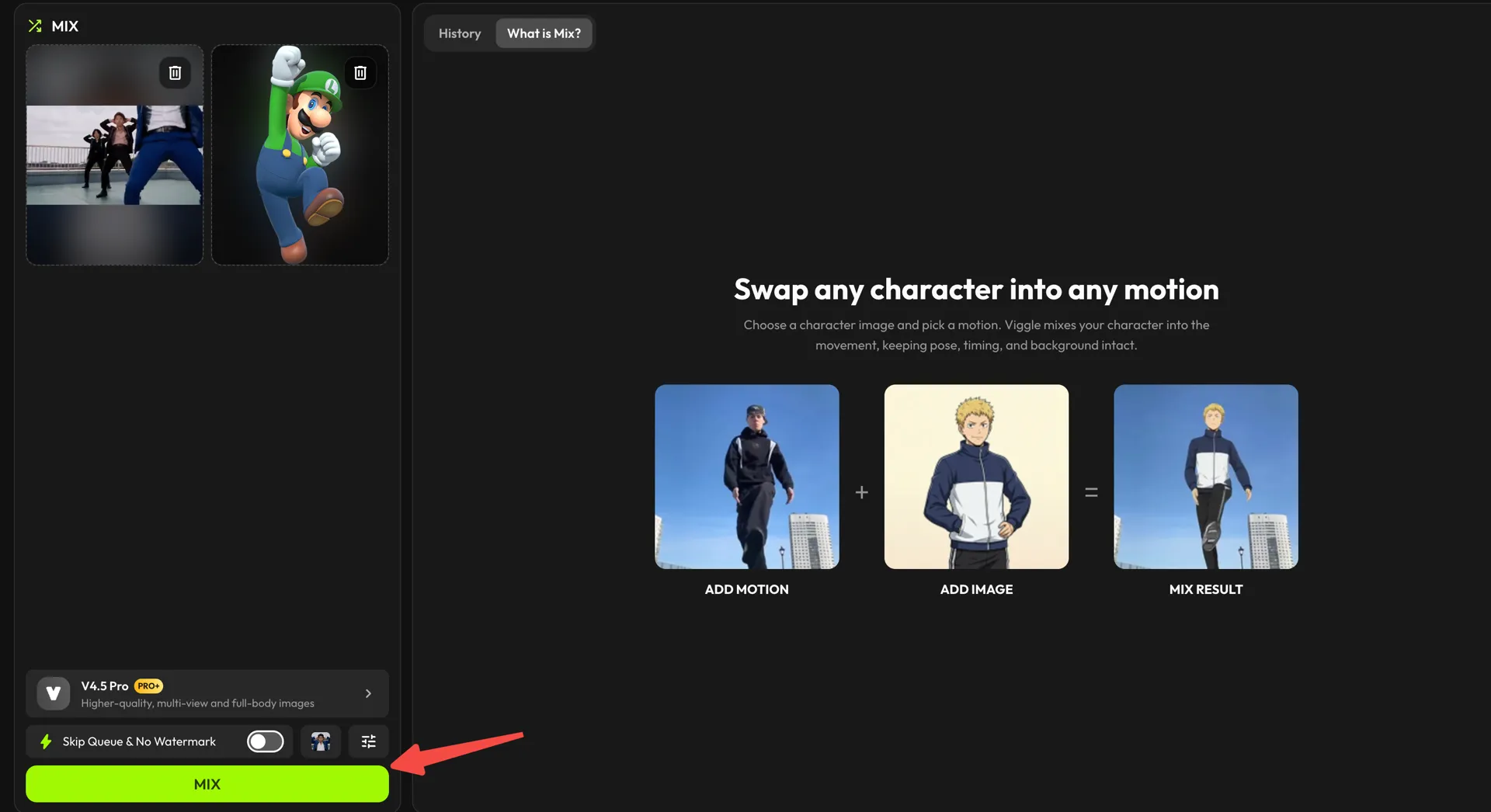
- Check the model at the bottom of the panel (V4.5 Pro gives higher-quality, full-body results), turn on “Skip Queue & No Watermark” if you want a clean export, then click “MIX.”
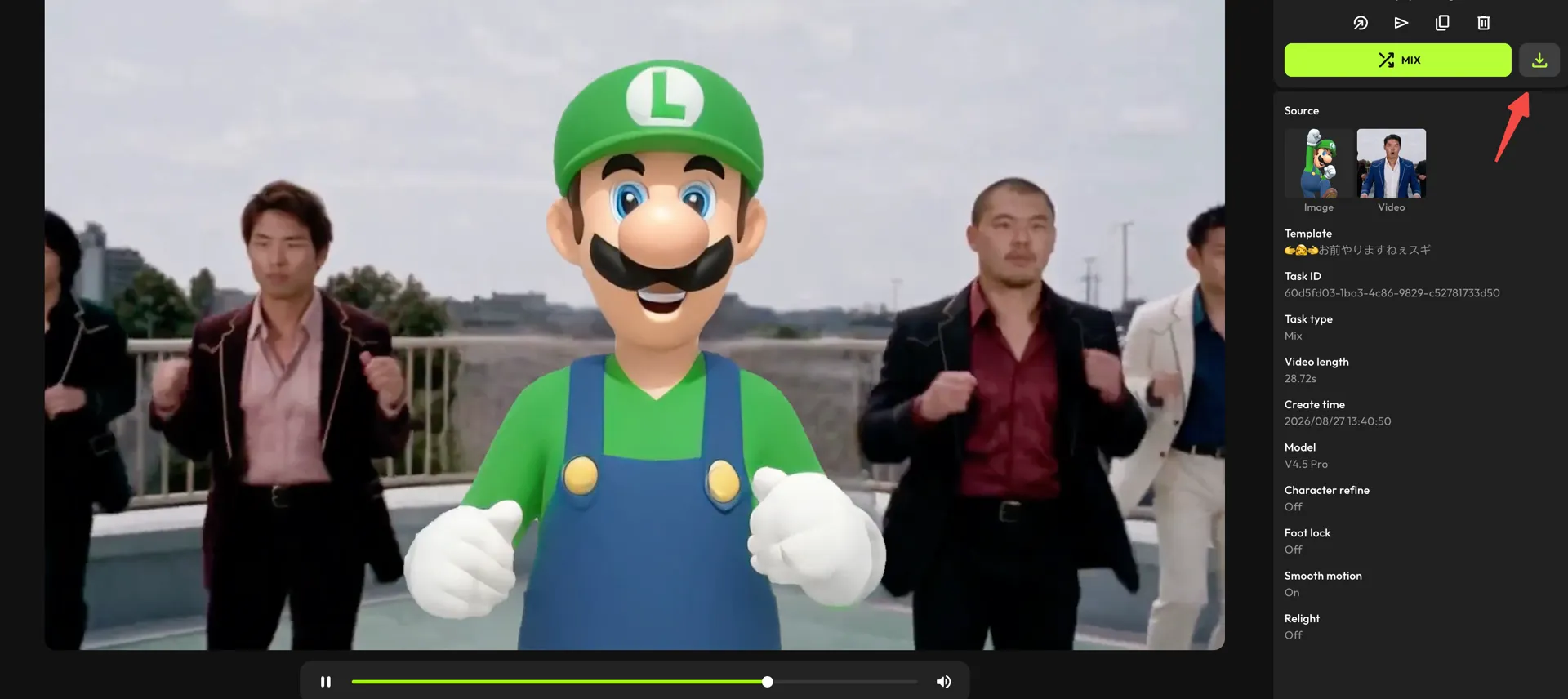
- Once your video is generated, click the download icon above the details panel to save it on your device.
Tips for Making Meme Videos Funnier#
Even if you have a crazy meme video idea, it may still not work if the delivery isn’t right. A meme video works when the humor hits instantly, the sound enhances the joke, and the final punchline lands at the perfect moment. Here are a few quick-win tips that can make a huge difference:
Timing#
Memes hit hardest when the joke reveals itself fast, usually within the first 1-2 seconds. If viewers need to “wait for it,” they scroll away. So, make sure to:
- Keep the funny action right at the start
- Avoid long intros or slow reveals
- Remove any tight cuts
Ultimately, a well-timed joke gets shared way more.
Audio Sync#
When a beat drop, sound effect, or lyric matches the character’s motion, the punchline becomes sharper. So, it’s better to:
- Use popular meme sounds already associated with jokes
- Align reactions with the beat for comedic impact
- Let audio guide the moment the joke lands
Remember, Bad sync = funny ideas wasted.
Punchline Placement#
Your punchline should be visible right when the viewer lands on your content, not after they’ve already scrolled past. Here’s a simple summary of the kind of placement that usually works well:
| Scenario | Where to Place Text | Why It Works |
|---|---|---|
| The face is the main joke (reaction meme) | Near the face or eyes, upper-center of frame | Viewers instantly catch the emotion |
| The movement/action is the funny part | Close to hands, legs, or gesture area | Directs attention to the motion |
| Setup + punchline format | Setup at the top, punchline mid-frame within first second | Joke lands right with the key movement |
| Avoiding UI interference | Keep text away from bottom overlay + like/share icons | Ensures punchline is visible |
The rule is simple: the joke should be readable before the motion completes, so the viewer is already laughing when the animation lands.
Using Trending Formats#
Going with the trends is always a good idea to give your meme a head start. To make this easier, the presets library on Viggle features some of the most famous characters, viral dances and game animations viewers already recognize.
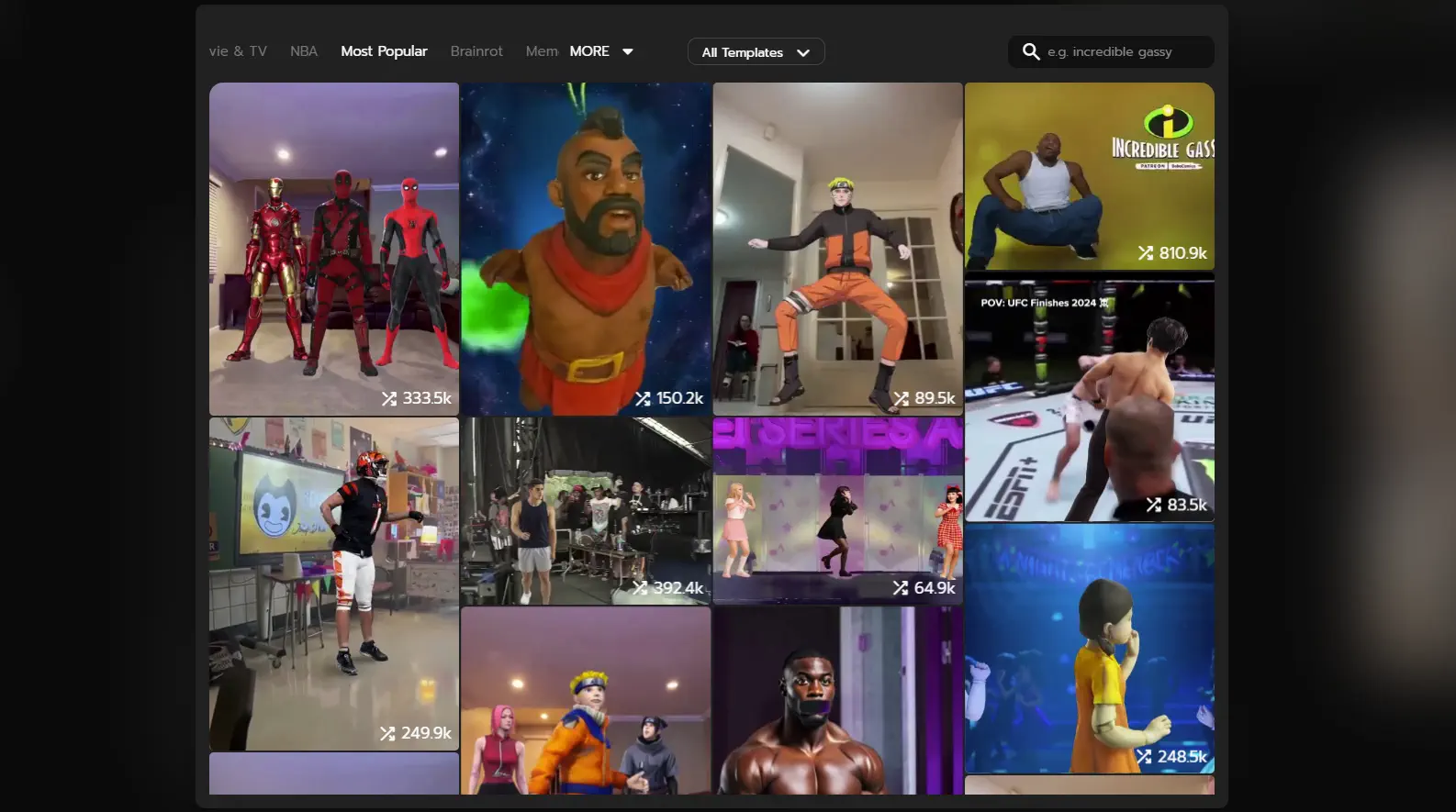
Since the format is familiar, the viewer immediately knows it’s a meme, and sticks around for the twist.
Conclusion#
Meme videos are one of the best ways to gather reactions, drive shares, and get discovered, especially when the image already carries personality and the motion adds a twist. And now that you know how to create one yourself, you’re all set to start experimenting with videos that keep people watching.
So take a photo, turn up the drama, and let Viggle bring it to life. Try a few versions, test different trending audios, and keep the format short and punchy. Because all it takes is one perfect reaction to blow up your notifications.
Try Viggle today, and give your images a personality upgrade!
FAQs About Meme Video Creation#
Can any image become a meme video?#
Yes, but images with clear expressions, clean backgrounds, and visible head/shoulders work much better.
How do I pick trending meme formats?#
Look for sounds, templates, and POV jokes already taking over Reels or TikTok. But if you’re late to a trend, remix it with a new twist.
Why does my meme video look distorted?#
This might happen if the face is angled too much, cropped, or heavily filtered. In that case, the AI struggles as features aren’t fully visible.
Can I add custom audio?#
Yes. You can download the animated clip and sync it with any audio inside TikTok, Reels, or a basic editing app.
How long should meme videos be?#
Normally, 8-10 seconds is the sweet spot. Short enough to replay, long enough for the punchline to land.
Are AI meme videos allowed on social platforms?#
Yes, as long as the content and images are your own or you have permission to use them. On the safe side, avoid copyrighted visuals you don’t own.