How to Do AI Face Swap Online Safely and Realistically
Viggle

How to Do AI Face Swap Online Safely and Realistically#
AI face swap tools didn’t grow slowly. They showed up everywhere, almost overnight. What started as playful filters and casual edits has now turned into powerful AI tools that can recreate faces, expressions, and movements with surprising accuracy.
However, the line between fun edits and misuse has become very thin. A lighthearted meme or parody can quickly turn misleading, uncomfortable, or even harmful if context, intent, or realism is ignored. That’s why safety and realism matter so much right now.
Not every face swap needs to look perfectly real, and not every edit should be pushed for shock value. In this blog, you’ll learn what AI face swap really is and how it works, what makes a face swap look realistic, major safety concerns, and how to use Viggle to create AI face swaps responsibly.
So, let’s dive in!
What Is AI Face Swap and How Does It Work?#
Before getting into the technical parts, let’s get the basics straight. You upload one image (the face you want to use) and one video (the motion and expressions).
The AI then replaces the face in the video with the uploaded face while trying to keep everything else intact: movement, lighting, and expressions. Basically, it looks like this:
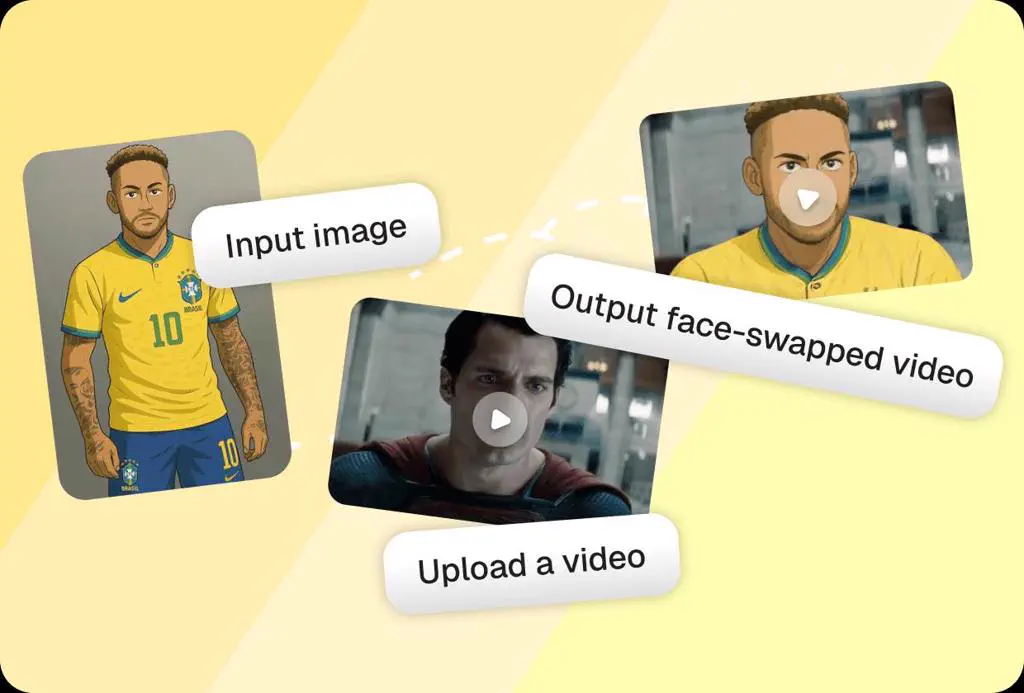
In simple terms:
- One face goes in
- One video provides motion
- A new face-swapped video comes out
Now, let’s break down how this actually works behind the scenes.
Facial Landmark Mapping#
This is the first thing the AI does before any swapping happens. The system scans the input face and identifies key facial points. These points act like a blueprint for where everything sits on the face.
What the AI maps:
- Eyes, eyebrows, nose, lips, jawline
- Distance between facial features
- Face angle and head orientation
This step matters because:
- It helps the AI understand face structure, not just appearance
- It ensures the swapped face aligns correctly with the video
- It prevents obvious distortions like drifting eyes or stretched mouths
Once landmarks are locked, the AI knows exactly where the face belongs in every frame.
Expression Transfer#
After mapping the face, the AI focuses on movement. Expression transfer means copying facial expressions from the video and applying them to the new face frame by frame.
What gets transferred:
- Mouth movements (talking, smiling, shouting)
- Eye blinks and gaze direction
- Subtle muscle movements like frowns or smirks
Why this step is critical:
- Expressions are what make a face swap feel alive
- Poor expression transfer is why swaps look stiff or creepy
- A good transfer keeps the emotion of the original video intact
If expressions don’t match the motion context, the face swap immediately feels fake, even if the face looks realistic.
Identity Preservation#
This is where responsible face swapping really comes into play.
Identity preservation means the AI keeps the core identity of the input face consistent, even while expressions and motion change.
Here’s what identity usually includes:
| Identity Element | What the AI Preserves |
|---|---|
| Facial proportions | Shape of face, jawline, forehead |
| Feature placement | Eye spacing, nose position, mouth alignment |
| Skin characteristics | Texture, tone, natural variations |
| Overall likeness | Recognizable look across frames |
All in all, good identity preservation makes sure the result still feels like the same person, not a shifting or blended face anywhere.
What Makes an AI Face Swap Look Realistic?#
Before calling a face swap “good” or “bad,” it helps to know what realism actually depends on. Let’s look at the main factors one by one.
Lighting Consistency#
Lighting is the first thing people notice, even subconsciously. If the face and the video don’t share the same lighting conditions, the swap instantly feels off…no matter how accurate the face is.
What the AI needs to match:#
- Direction of light (from left, right, top, or front)
- Light intensity (soft indoor light vs harsh outdoor light)
- Shadows around the nose, jawline, and eye sockets
Why this matters:#
- Mismatched lighting makes the face look pasted on
- Incorrect shadows break depth and realism
- Consistent lighting helps the face blend into the scene
When lighting is aligned, the face feels like it belongs in the video instead of floating on it.
Expression Matching#
A realistic face swap moves the right way at the right time. Expression matching ensures the swapped face reacts exactly like the original face in the video...without lag, stiffness, or exaggeration.
What needs to line up:
- Mouth shape with speech or reactions
- Eyebrow movement with emotion
- Eye focus and blinking rhythm
Why this matters:
- Even small delays make the face feel unnatural
- Over-smoothed expressions kill emotion
- Mismatched reactions create an uncanny effect
Eventually, when expressions sync naturally, viewers stop noticing the swap and focus on the content instead.
Skin Tone Blending#
Skin tone is subtle, but it’s a major realism cue. That’s exactly why even a well-lit, well-expressed face swap can fail if the skin tone doesn’t blend naturally with the video environment. Here are a few elements involved in blending to care:
- Matching overall skin tone to scene lighting
- Avoiding harsh color edges around the face
- Keeping natural texture instead of plastic smoothness
Eventually, good skin tone blending helps the face melt into the frame, making the swap feel intentional rather than artificial.
What Are the Safety Concerns With AI Face Swap Tools?#
AI face swap tools have become fast, accessible, and extremely convincing. And that’s exactly why safety needs attention. Once you understand where things can go wrong, it becomes much easier to avoid those mistakes while creating content. So, here are the 3 most important safety concerns to take care of:
Consent#
It means the person whose face is being used knows what kind of video is being created, how their face will move, and where that video might end up. A photo shared casually, or even willingly, doesn’t automatically translate into permission for animated face swaps.
Most issues start small. Someone shares an image. It feels harmless. The face swap looks fun. But once expressions, motion, and realism are added, the content becomes something very different from the original photo.
At that point, intent matters more than access.
That’s why safe face swapping usually starts with one simple question: “Would this person recognize themselves here, and be okay with it?”
If and when that answer is unclear, consent probably is too.
Identity Misuse#
As face manipulation gets more and more realistic, its misuse has simply moved beyond jokes and pranks. In fact, in 2023, attacks that can bypass biometric authentication increased by 704%. That jump itself shows how realistic face replication is now being used to imitate real people, sometimes convincingly enough to fool systems and humans alike.
A face swap doesn’t need to be extreme to be misused. Even subtle swaps can:
- Create believable impersonations
- Be taken out of context
- Be reused in ways the original person never agreed to
The more realistic a face swap looks, the easier it is for it to travel beyond its original purpose, and that’s where risk quietly builds.
Data Privacy#
Every face used in a swap is data. And once uploaded, that data can be stored, processed, reused, or combined with other information.
This opens up two risks at once.
- First, how facial data is handled by tools (whether images are retained, reused, or shared).
- Second, how outputs themselves can be misused after export, especially when faces are realistic enough to be mistaken for real footage.
Because of this, face swap tools and creators are expected to align with data protection frameworks such as:
- GDPR for personal data handling
- Local data protection and IT laws
- Platform-specific content and impersonation policies
Ignoring privacy doesn’t always cause instant problems. But once content spreads, control is hard to regain.
How to Use Viggle to Do AI Face Swap Safely#
The good part is that safe face swapping doesn’t require extra effort. It comes down to making the right choices while creating the video. This is where Viggle’s Face Swap Video Generator helps by giving you control over inputs, motion, and output, instead of blindly pushing realism.
Here’s a step-by-step guide to creating AI face swaps using Viggle:
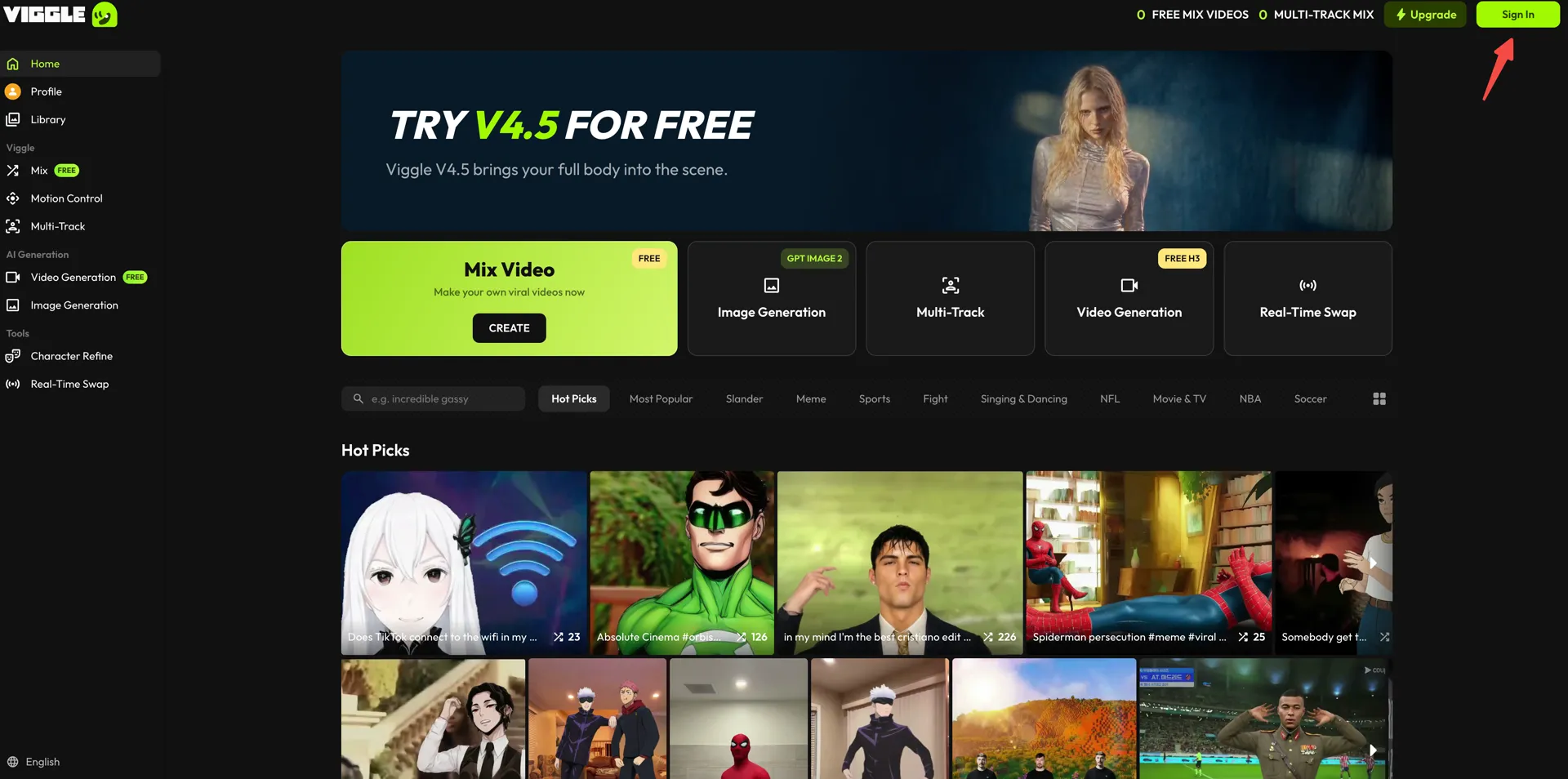
- Create your account on Viggle AI using your email, Google account, or Apple ID. If you already have an account, click “Sign In” in the top-right corner.
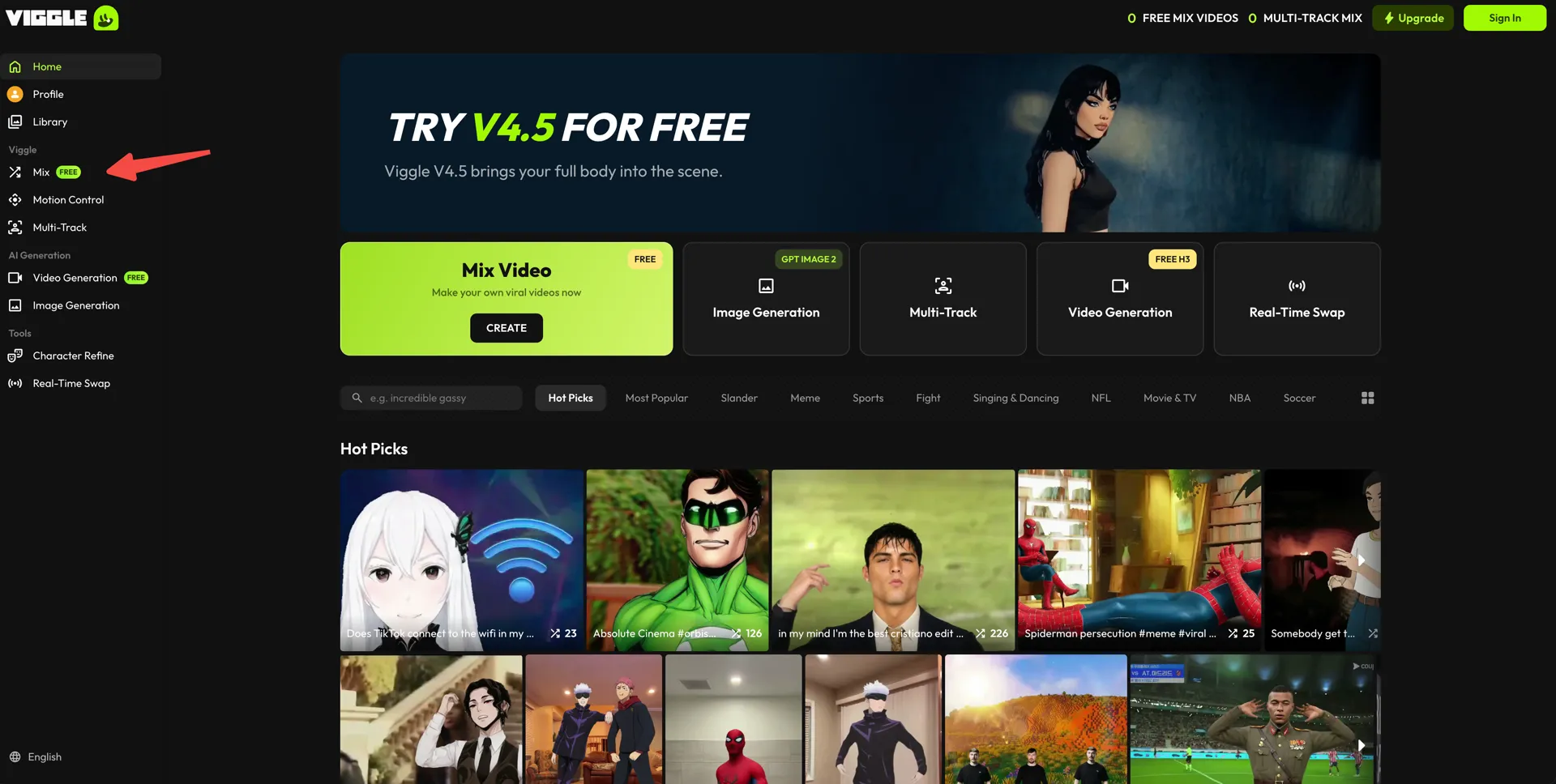
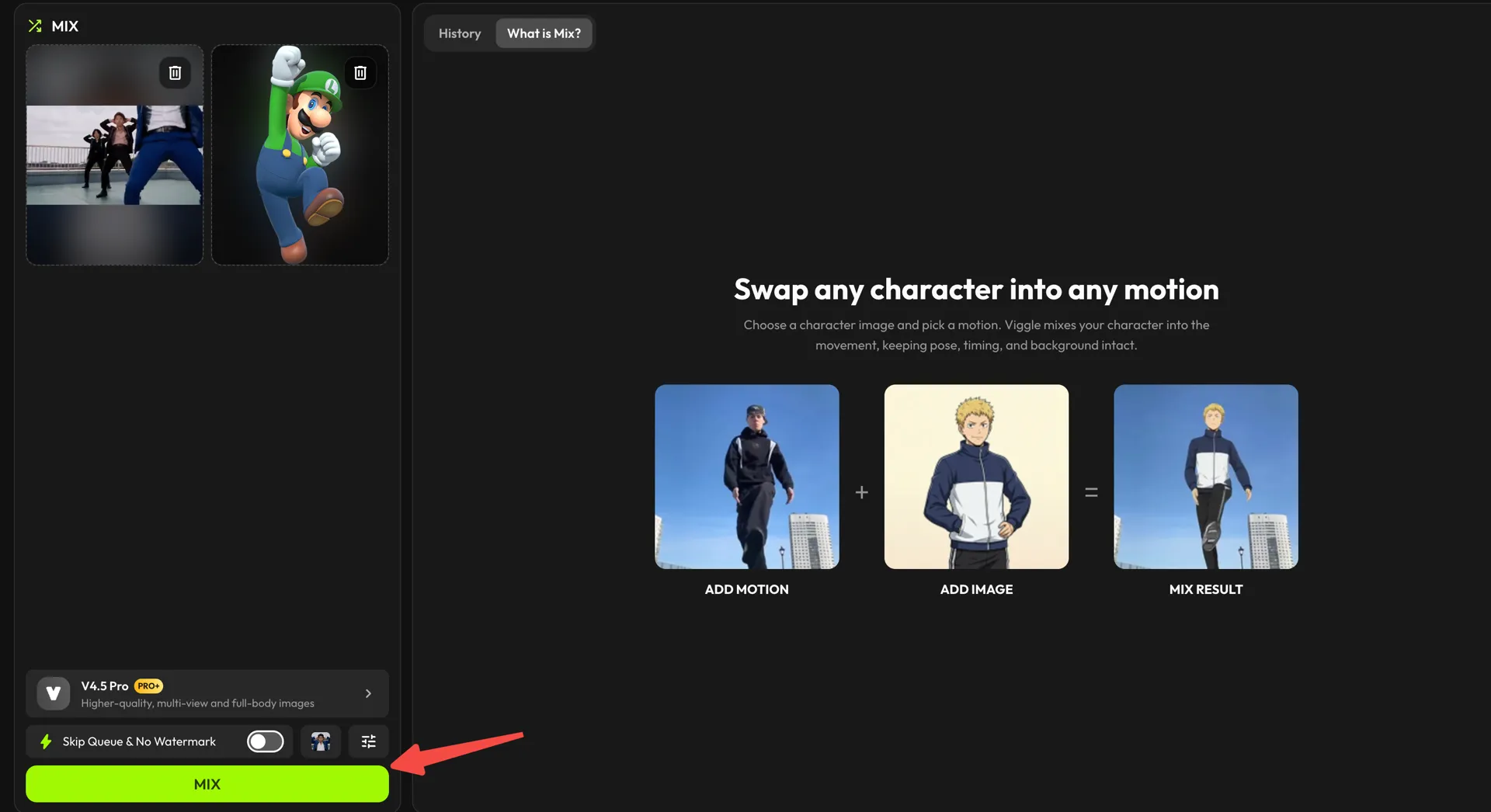
- After logging in, open the “Mix” workspace from the left sidebar.
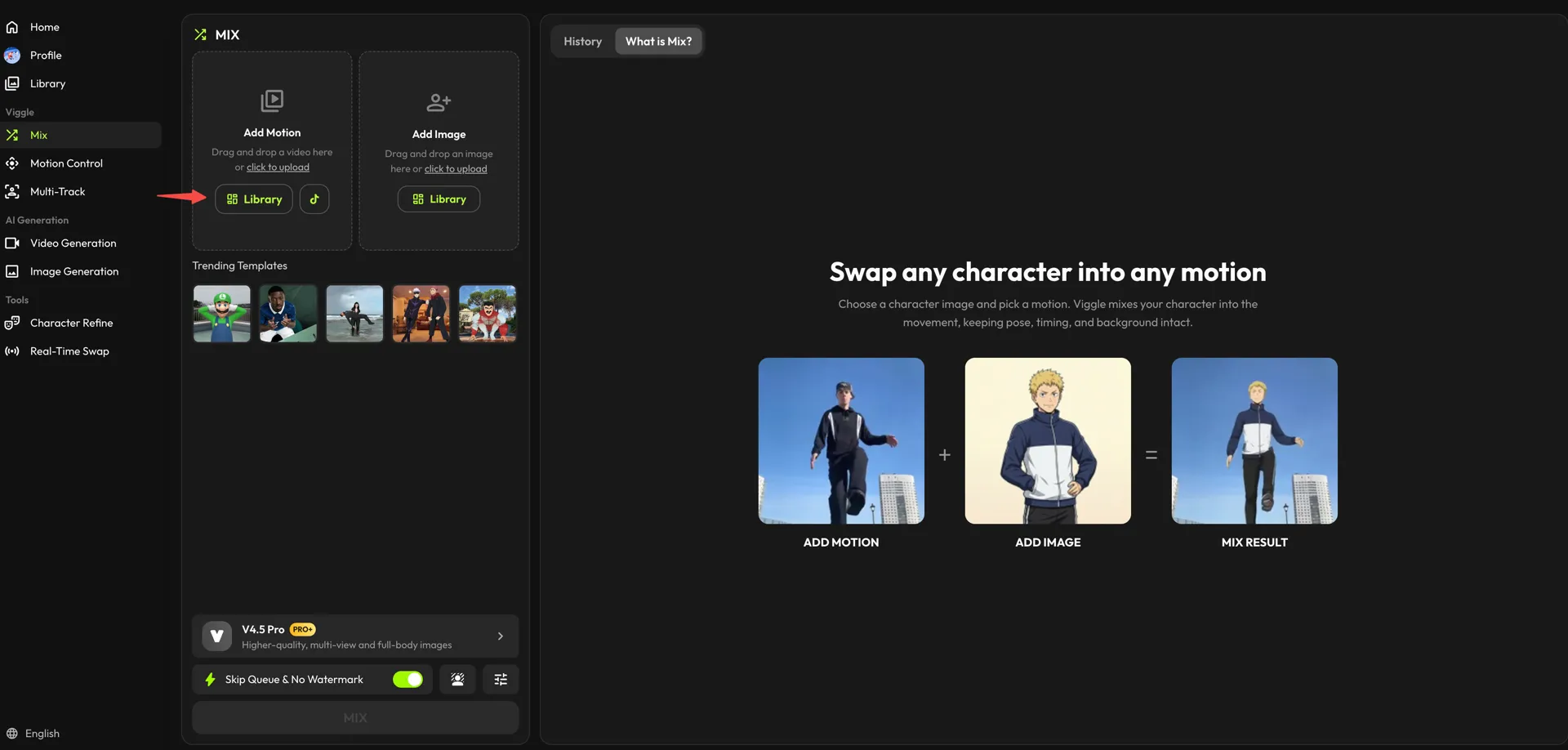
- In the “Add Motion” card, choose the clip whose movement you want to keep. Press “Library” for a preset, or bring your own footage in with “click to upload.”
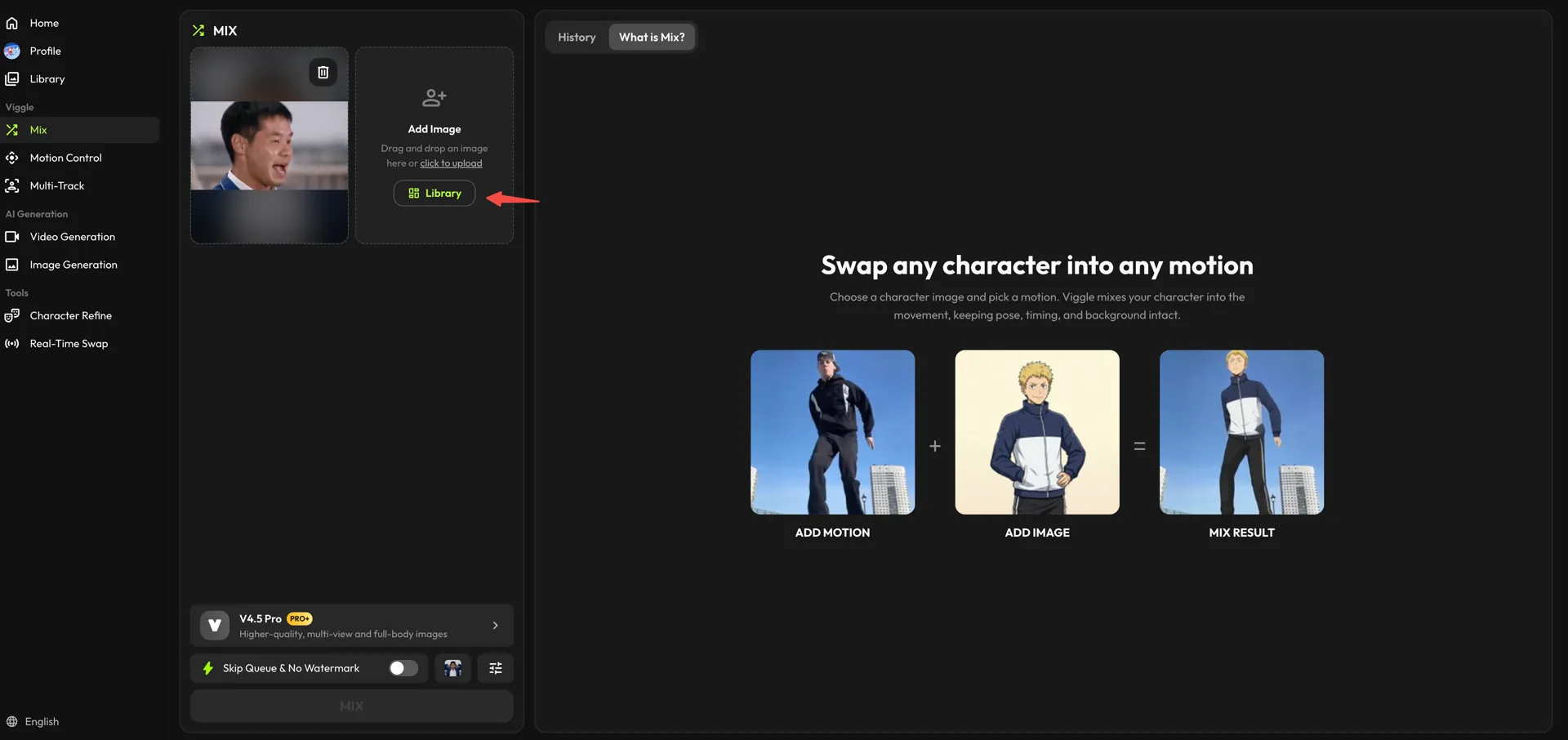
- Now fill the “Add Image” card with the character you want on screen — from the “Library,” or your own file via “click to upload.” Viggle applies this character to the motion you loaded, keeping the movement intact while changing the appearance.
- Check both inputs before proceeding. Pick your model (V4.5 Pro gives higher-quality, full-body results), then generate the video by clicking “MIX.”
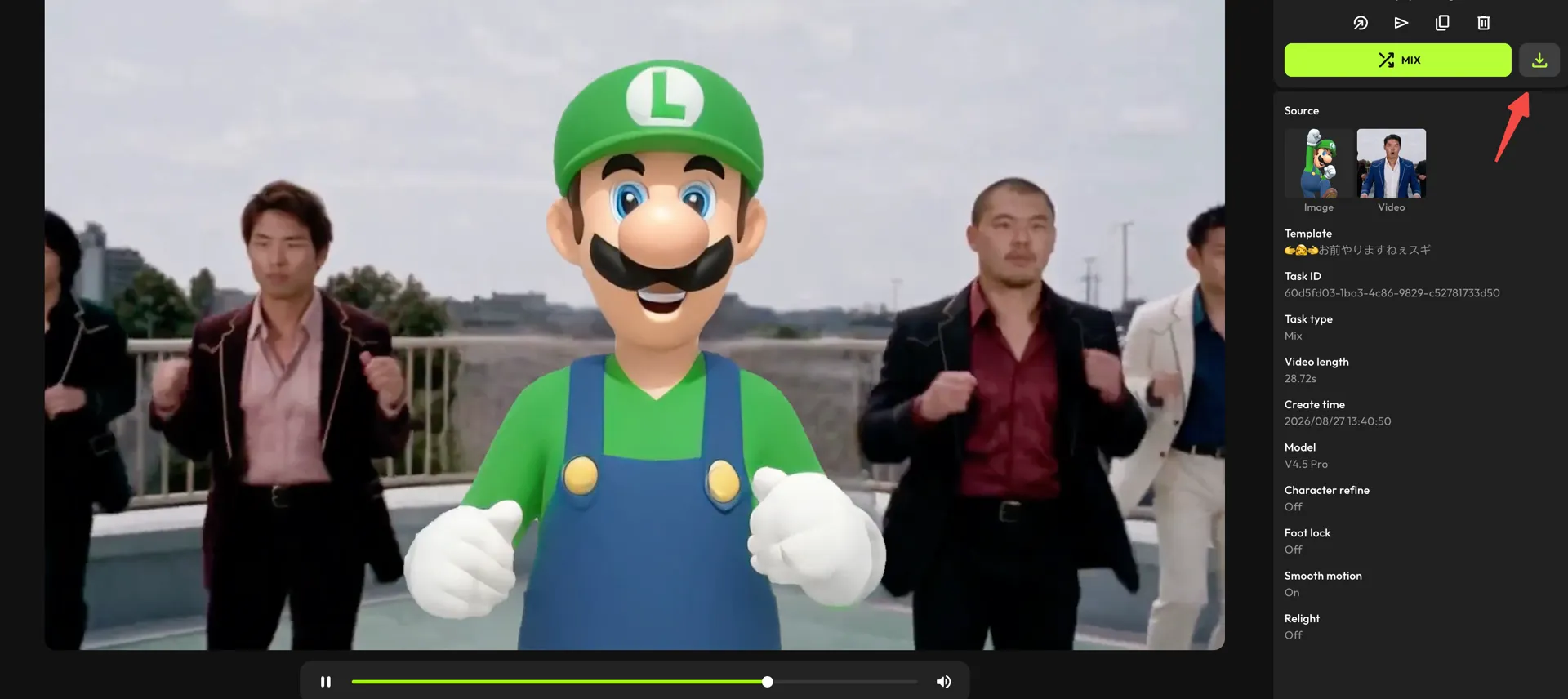
- Once processing is complete, click the download icon above the details panel to save the final output.
Best Practices for Safe AI Face Swapping#
AI face swapping is powerful, but that power comes with responsibility. Why? Because using it safely is more about avoiding problems that can easily be prevented with the right practices. So, let’s break down the key best practices one by one.
Avoid Impersonation#
Impersonation is where most AI face swap issues begin. Using someone’s face in a way that makes it seem like they said or did something they didn’t can quickly cross ethical and legal lines.
What works better:
- Avoid swapping faces of real people into sensitive or misleading scenarios
- Don’t make content that could be mistaken for real footage
- Be extra careful with public figures, officials, or private individuals
If the intent is parody or humor, make that obvious. Clarity matters more than cleverness here.
Use Personal Or Licensed Images#
The safest face swaps start with images you have the right to use. This means either your own images or content that is clearly licensed for reuse.
Some good options include:
- Your own photos or videos
- Images shared with clear permission
- Licensed stock platforms
Credible sources for licensed images are:
- Unsplash
- Pexels
- Pixabay
- Adobe Stock
- Shutterstock
However, always avoid pulling random faces from social media or Google Images. If you don’t have permission, it’s better not to use it.
Follow Platform Rules#
Every platform treats AI-generated and face-swapped content differently. Here’s a quick overview for your reference:
| Platform | Key Safety Rules |
|---|---|
| Label AI-generated content. Avoid deceptive or misleading edits. | |
| TikTok | No impersonation or realistic deepfakes without disclosure. |
| YouTube | Disclosure required for altered or synthetic media. |
| X | Synthetic media must not mislead or cause harm. |
However, rules change often, so it’s a good habit to check updates before posting.
Conclusion#
AI face swapping sits in a unique place. It’s exciting, creative, and powerful, but also sensitive. The same technology that makes content more engaging can create problems if used carelessly. That’s why the small things matter: Knowing when not to swap and using the right images.
When those basics are in place, face swapping becomes a creative tool you can actually rely on. That’s where Viggle fits in, which is designed to help creators move fast while still staying in control of how their content is made and shared.
So, if you’re going to use AI face swap, use it thoughtfully. Try Viggle Today and start creating face swap videos with better clarity, control, and confidence.
FAQs#
1. What is the best use case for AI face swap tools?#
AI face swap tools work best for creative content like memes, reactions, parody, and short videos where speed and expression matter more than realism.
2. How realistic can AI face swap results look today?#
Pretty realistic, especially with good lighting and clear images. But most creators intentionally keep it slightly stylized so it doesn’t feel misleading.
3. What type of images work best for AI face swapping?#
Clear, front-facing images with neutral expressions work best. Moreover, good lighting and minimal shadows also make a noticeable difference.
4. Can AI face swap be used for creative and entertainment content?#
Absolutely. In fact, that’s where it shines the most, memes, reels, skits, and reaction videos, where creativity comes first.
5. How do creators keep AI face swap videos looking natural?#
They match the face to the motion, avoid extreme realism, and also tweak expressions so the result feels intentional, not forced.