Meridian: A new perspective on space and time
A geometry-guided video model for authoring new observations of existing events: revisit a recorded moment from a new viewpoint, retime the action, and move the camera along a path you choose.
Viggle AI
Meridian: A new perspective on space and time#
One event. Anywhere. Anytime.
Meridian is a geometry-guided video model for authoring new observations of existing events. Revisit a recorded event from a new viewpoint. Let the action unfold, slow it down, or hold a moment still—all while moving the camera along a path you choose.
Choose where. Choose when.#
- Where: choose the camera path, viewing direction, and field of view.
- When: choose which moments to show and how fast the action moves.
Bullet time is one combination—not the boundary of the model. To slow down or speed up the action, retime the input video first. Then design the camera path over that timeline. You can also create a camera move from a single image.
The motocross example includes the original video and a diagram of the planned camera path. The ballet example uses a single photograph.
A dunk. A new look at the same play. This edit combines generated views with original footage, including the dunk's finish.
Play. Hold. Resume. Pause the splash, move the camera, then let the action continue.
Compose a camera path. Orbit, move sideways, and change distance—all in one continuous shot.
One image. Another viewpoint. A camera move from a single ballet photograph.
Method#
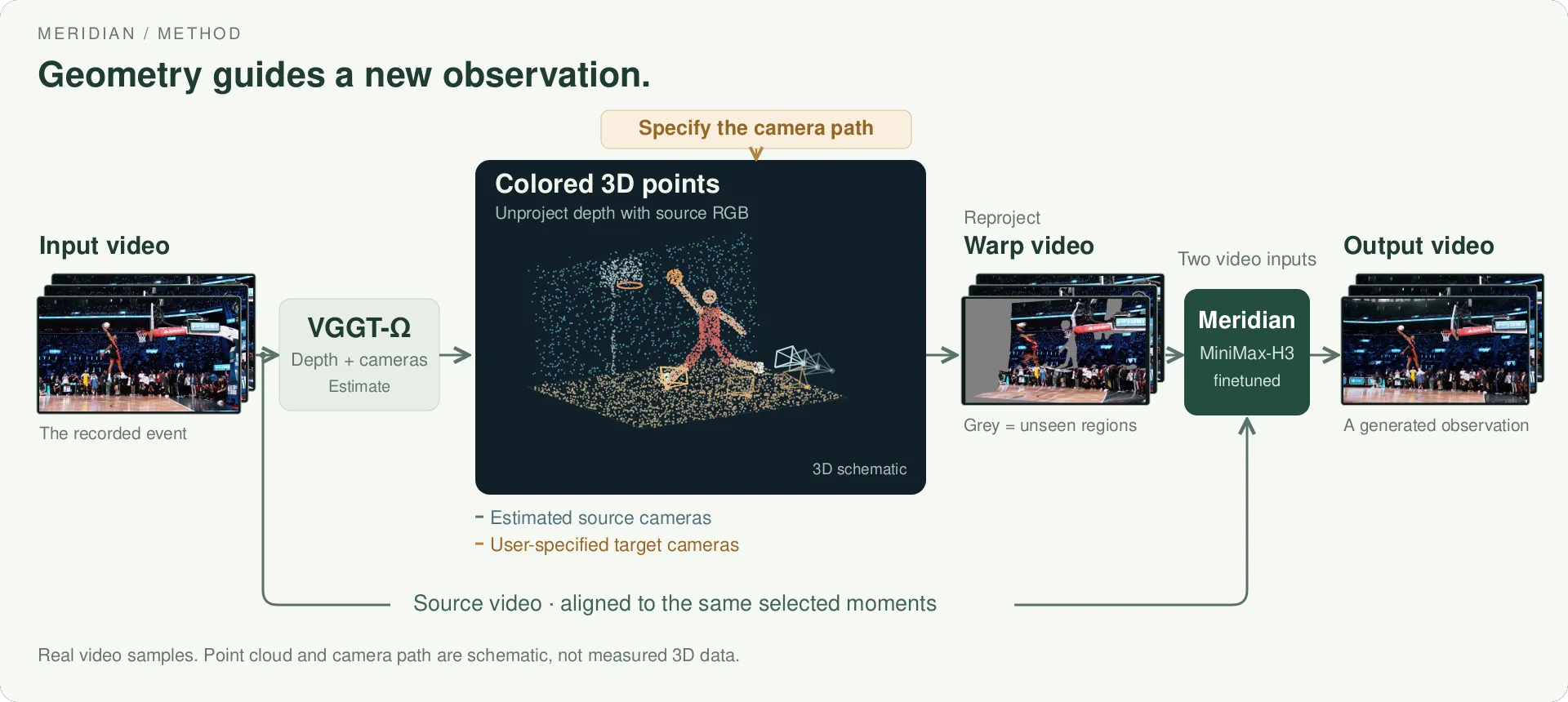
The same moment in the input, warped reference, and output. The 3D points and cameras are schematic.
The method is simple: use geometry to show a video model where to look.
1. Build the reference. VGGT-Omega estimates depth and camera poses from the input video. We turn the selected frames into colored 3D points and render them along the new camera path. This gives us a warped video—a rough preview of the new view.
2. Generate the shot. Meridian, built on MiniMax-H3, takes the input video and the warped reference, with each pair of frames showing the same moment. The reference guides the new view; the model fills in missing regions and refines the image.
Preview before generation. Once the 3D points are available, rendering the reference is fast. You can check the framing and camera motion, spot gaps in the view, and adjust the path before running the video model.
Limitations#
Unseen regions are generated, not recovered.
- Geometry robustness. Meridian generally handles imperfect geometry well, but cannot reliably recover from severe errors or a badly warped reference.
- Large moves are less stable. Full 360° orbits can work, but large viewpoint changes can cause distortion, drift, or inconsistent details in newly visible areas.
- Timing and continuity. Retiming changes which input frames are used; it does not recover missing motion. Separately generated clips may not join smoothly.
Try Meridian#
The release includes a very basic, vibe-coded Studio demo—an example of how to use Meridian, not a production editor. You can design camera paths with multiple keyframes and preview them in 3D in real time. Video generation is not real time.
Beyond the frame#
A camera's position shapes how an event is seen: what draws our attention, what feels close, and what remains outside the frame. Meridian explores keeping some of those choices open after capture.
For filmmakers, this means more than choosing which footage to use: it means composing a new shot after the moment has passed. In the future, viewers might share that freedom—choosing an angle, following a subject, or spending more time with a detail, instead of watching a single fixed sequence.
The event has passed. The choice of how to see it remains open.