Viggle-Animate vs Wan Animate
Both replace the character in a video and both ship open weights. The difference is what each one needs before it can start, and how long it runs. Wan Animate takes a character image plus a preprocessing pass for pose, face, mask and background. Viggle-Animate takes the clip and one of its own frames, repainted — then 3 forward passes instead of 40.
- 26s per render vs 160s, same B200 and same 124-frame clip
- 3 forward passes instead of 40
- No pose estimator, segmenter, face tracker or text encoder at video inference
- Sharper detail and closer pose tracking in fast motion
- Hosted version runs in the browser with no GPU
- 17.3B parameters against Viggle-Animate’s 33.1B — lighter to run locally
- Takes a plain character image, no frame repainting step
- Pose, mask and background are separate, inspectable inputs
- Mature ecosystem of ComfyUI workflows built around it
Where the difference actually comes from
3 forward passes, not 40
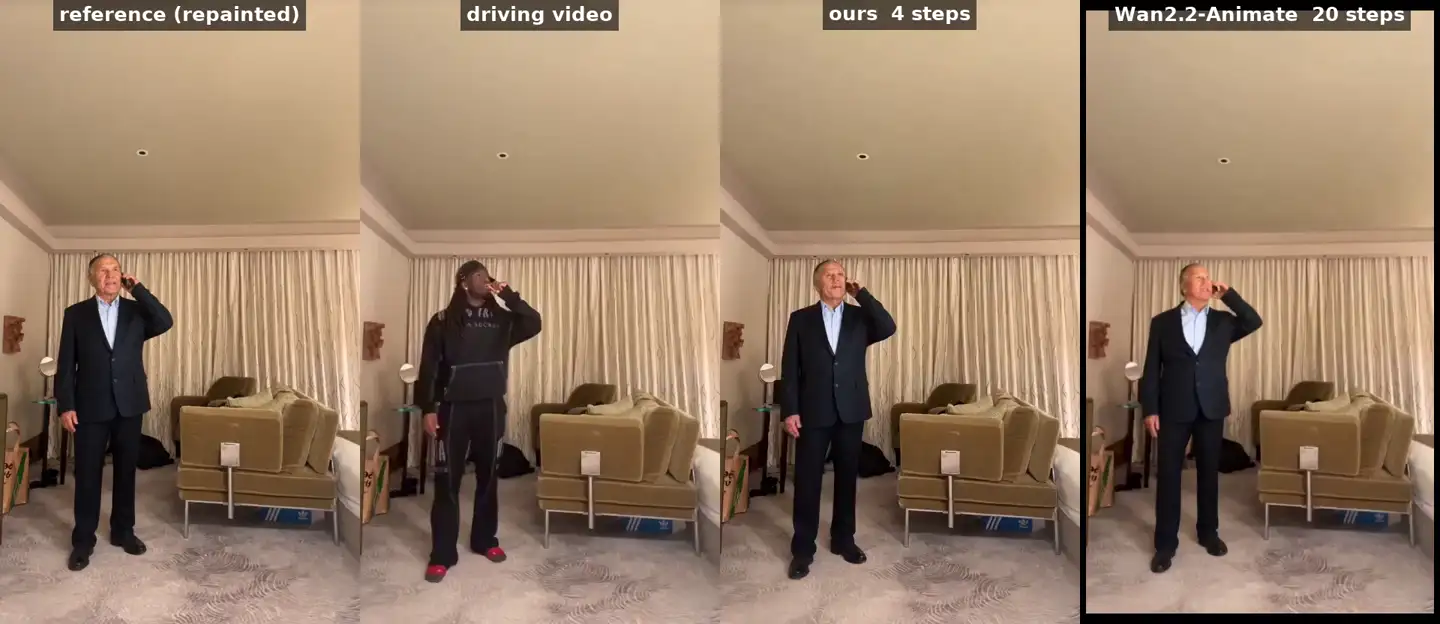
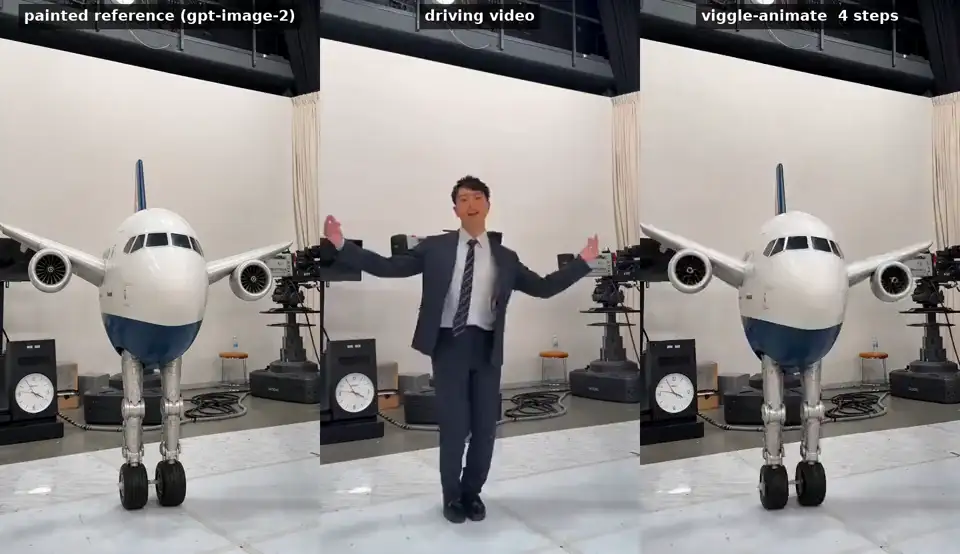
Four sigma boundaries mean three passes between them, for the whole 124-frame clip in one window. Wan runs a 20-step sampler, and because its window is 77 frames a 124-frame clip becomes two chained segments — 40 passes in total. The clip labels below count sampler steps per segment (4 against 20); the table counts total passes (3 against 40). Both describe the same two runs. Viggle-Animate is also the bigger model at 33.1B against 17.3B, so it is not winning by being lighter, and 26s is what one B200 does — your own hardware will differ.
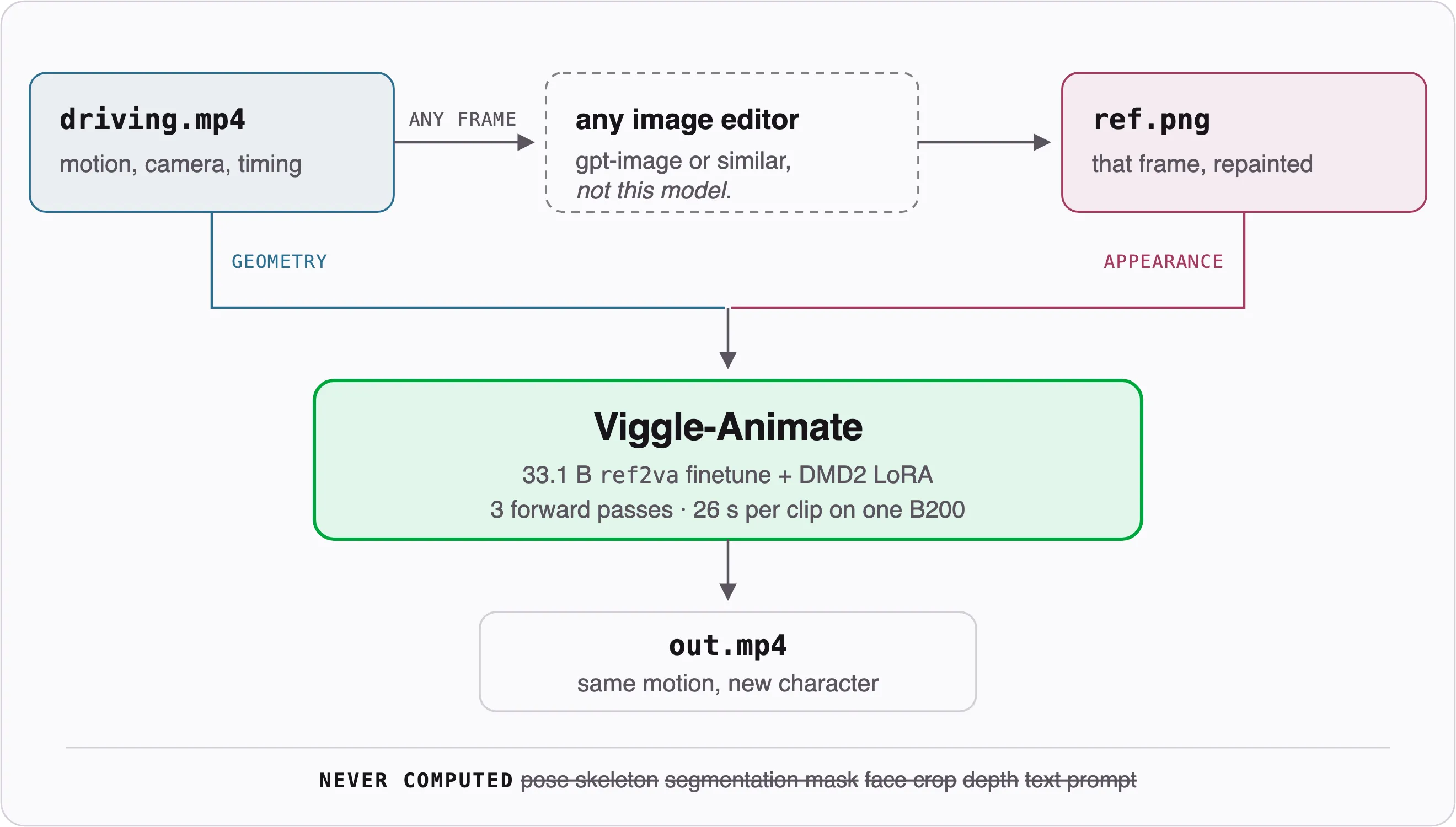
The repainted frame replaces the whole rigging step
Edit one frame of your own clip in any image editor, and that frame carries the character through the shot. No pose skeleton to extract, no mask to clean up, no face tracker to fight. What you painted is what propagates.
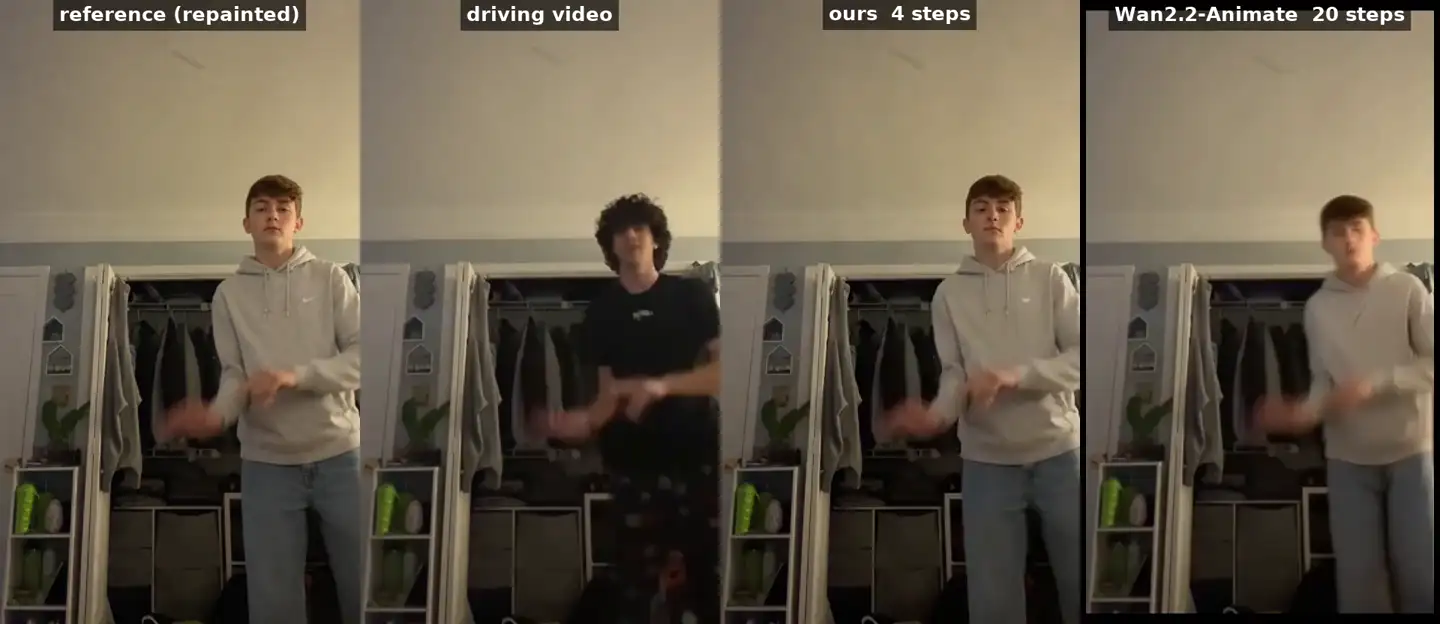
Fast motion is where it separates
Character replacement usually breaks exactly when things move quickly. In side-by-side renders Wan2.2-Animate-14B smears around rapidly moving heads and limbs, while Viggle-Animate keeps detail and matches stance width, arm extension and the timing of extreme poses — with no pose input at all.
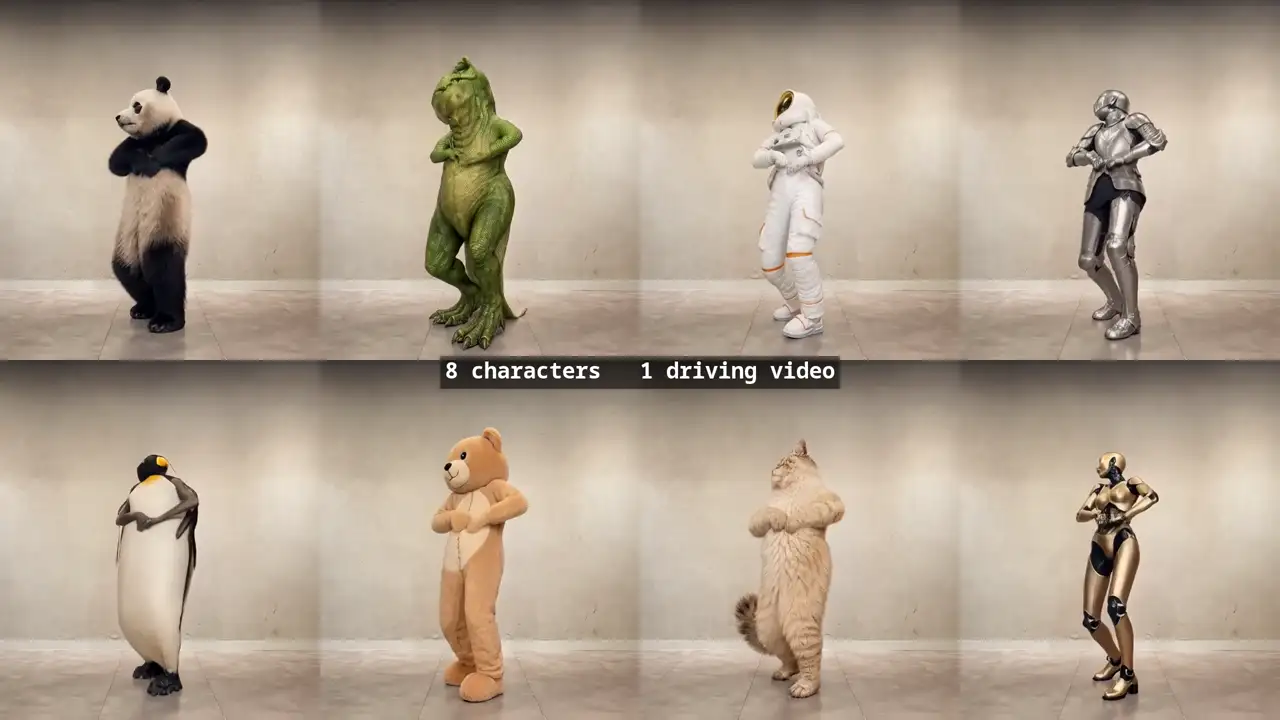
No skeleton means no humanoid assumption
Because nothing extracts a pose, the same two-input interface handles animals, stylized and illustrated characters, and non-humanoid objects — the airliner is the hardest published case. A pipeline built around a pose estimator can only go as far as the estimator understands the subject.
Measured side by side
| Feature | Viggle-Animate | Wan Animate |
|---|---|---|
| Speed and compute | ||
| Render — 124 frames, 24 fps, 480×832, one B200 | 26 s | 160 s, excluding its preprocessing pass |
| Sampling alone | 13.6 s | 140 s |
| Forward passes for the whole 124-frame clip | 3 — four sigma boundaries, so three passes between them | 40 — 20 sampler steps, run twice because 124 frames needs two segments |
| Frames per pass window | 124 in one window | 77 per segment, chained with one conditioning frame |
| Parameters | 33.1B — the larger of the two, so it needs more VRAM locally | 17.3B — lighter to run on consumer hardware |
| Inputs and setup | ||
| Inputs | Driving video + one repainted frame from that same video | Driving video + character image |
| Preprocessing before video inference | None | Pose, face, mask and background pass, plus a relighting LoRA in replacement mode |
| Pose skeleton required | No | Yes |
| Auxiliary models at video inference | 0 | Pose estimator, face and mask models |
| Text prompt at video inference | Not needed | Not needed |
| Output | ||
| Fast motion — head whips, high kicks, extreme extension | Holds character detail and follows the source pose | Tends to lose detail and smear around fast limbs |
| Motion, camera, timing and background preserved | Yes | Yes |
| Animals, stylized and non-humanoid characters | Same interface, no skeleton assumption | Depends on the pose model handling the subject |
| Access | ||
| Open weights | Yes, on Hugging Face | Yes, on Hugging Face |
| Runs in WanGP and ComfyUI | Yes | Yes |
| First-party hosted version, no GPU | Yes, in the browser | Third-party hosts only |
Which one should you pick?
Choose Wan Animate if…
- You are running locally on a consumer GPU and 17.3B fits your VRAM where 33.1B does not.
- You need explicit, inspectable control over pose, mask and background as separate inputs.
- You already have a Wan-based ComfyUI pipeline and the switching cost outweighs the render time you would save.
- You would rather hand the model a plain character image than repaint a frame first.
Choose Viggle-Animate if…
- You are iterating and render time is the bottleneck — 26s against 160s per attempt compounds fast.
- Your footage has fast motion or extreme poses, where the quality gap is widest.
- You do not want to maintain a pose estimator, segmenter and face tracker just to swap a character.
- You have no GPU and want the hosted version instead of a local install.
- Your subject is an animal, an illustration or something non-humanoid that a pose model would struggle with.
Common questions
Is Viggle-Animate really 6× faster than Wan Animate?
6.1× per render and 10.3× counting sampling alone, measured on the same machine and the same B200 GPU with the same source videos at 124 frames, 24 fps and 480×832: 26s against 160s, and 13.6s against 140s of sampling. The 160s figure does not include Wan’s preprocessing pass, so the practical gap is wider. On pass counts: Viggle-Animate runs 3 passes over the whole 124-frame clip in one window, while Wan runs a 20-step sampler over a 77-frame window, so 124 frames becomes two chained segments and 40 passes in total — which is why comparison clips labelled “4 steps” and “20 steps” describe the same runs as the 3-against-40 row. Viggle-Animate is the larger model of the two — 33.1B against 17.3B — so the speed comes from running 3 forward passes instead of 40, not from being a smaller network.
Do I need a GPU to use Viggle-Animate?
Not for the hosted version — it runs in the browser and you only upload a character image. For local use the weights are on Hugging Face and already run in WanGP and community ComfyUI nodes. Bear in mind the 26s number is a B200 benchmark; on a consumer card it will take longer, and at 33.1B parameters it needs more VRAM than Wan’s 17.3B.
Does Viggle-Animate need a pose skeleton or mask like Wan Animate?
No. Once the repainted frame is prepared, video inference runs with zero auxiliary models — no pose estimator, no segmenter, no face tracker, no text encoder. Wan Animate runs a preprocessing pass for pose, face, mask and background before sampling starts.
What is a repainted frame, and is preparing it extra work?
It is one frame taken from your own driving video with the character edited in an image editor — the published method uses gpt-image. It is a step Wan does not have, and it is the one place Wan is simpler: Wan takes a plain character image instead. The trade is that the repainted frame removes the pose, mask and background preprocessing entirely, and it is a single image edit rather than a per-clip pipeline.
Which handles fast motion better?
Viggle-Animate, and that is where the published comparisons separate most. Wan2.2-Animate-14B tends to lose detail and smear around rapidly moving heads and limbs, while Viggle-Animate keeps character detail sharper and follows the source pose more closely — stance width, arm extension, limb displacement, and the timing of extreme poses — despite receiving no pose skeleton.
Are both models open source?
Both publish open weights on Hugging Face, and both run in WanGP and ComfyUI. The difference in access is the hosted side: Viggle runs a first-party hosted version you can use without any local setup, while Wan Animate is only available hosted through third parties.
When is Wan Animate the better choice?
When you are running locally and 17.3B fits your VRAM where 33.1B does not; when you need pose, mask and background as separate inputs you can inspect and override; or when you already have a Wan-based ComfyUI pipeline and the switching cost outweighs the render time you would save.
Is it free to try?
The weights are free to download and run yourself. The hosted version is free to try, and heavier use moves onto a paid plan — see the pricing page for the current tiers.
Try it on your own clip and compare the result yourself.
Start a renderChange the character,
keep the shot
One clip, one character image, no pose rig and no prompt. Try it in the browser, or download the weights and run it yourself.
Try Viggle-Animate free