7 Best AI Video Generators in 2025: Real Tests, Honest Results, and Best Fits For You
Danni Li

AI-generated videos are everywhere. These days, you can't scroll through TikTok, Instagram, or YouTube without seeing one. Watching them is easy, but producing high-quality video content isn't. Scripting, shooting, editing, and polishing can be a huge time sink.
That's where AI video generators come in. The market is emerging, with dozens of tools launching every month. But which ones are actually worth your time? After testing the most popular options, we narrowed it down to the 7 best AI video generators in 2025, each with strengths for different needs, from viral memes to cinematic filmmaking.
What Makes an AI Video Generation Tool the "Best"?#
To help you find the best AI Video Generator app, we compared tools based on:
- Features: What are the key features of the app, such as face swap, text-to-video, music video, image-to-video, etc)
- Motion Control: How much control do you have over character movements?
- Ease of Use: How beginner-friendly is the tool?
- Price: Is there free plans or trial? What are the paid plan options?
- Barrier to Entry: How much effort/creativity/preparation you need before you can start making content?
- Trend Integration: Is the platform in sync with viral formats?
AI Video Generators Compared#
Here is a summary table of our top picks for the best AI video generators in 2025 to give you a quick overview.
| Tool | Free Plan/Trial | Cheapest Price (USD) | Motion Transfer | Text-to-Video | Templates/Trends | Ease of Use | Barrier to Entry | Best For |
|---|---|---|---|---|---|---|---|---|
| Viggle AI | Yes | Free | Yes | No | Strong (memes, dances) | Easy | Lowest (no scripts/footage needed) | TikTok, memes, viral content |
| Runway | Yes | Free | No | Yes | No | Medium | High (prompt-based) | Cinematic, filmmaking |
| Veo (Google) | Limited access | $32.99/month | No | Yes | No | Medium | High | Long-form, creative projects |
| Hailuo | Yes | $9.99/month | No | Yes | Yes (templates) | Medium | High (prompt-based) | Short clips, prompt-driven video |
| Kling AI | Limited access | $6.99/month | No | Yes | Yes (templates) | Medium | High | cinematic realism |
| Synthesia | No | $18/month | No | Script-to-Avatar | No | Easy | Medium (needs scripts) | Business, corporate training |
| Higgsfield AI | Limited access | $9/month | No | Yes | Yes (templates) | Medium | High (prompt-based) | Realistic human characters, avatars |
- Viggle AI stands out for its motion transfer, face-swapping and ready-to-use meme templates. It's the only tool offering direct control over motion without the need of scripts or footage, so it lowers the techinical barrier for creators who wants to create memes and viral short-form videos on TikTok, Instagram and YouTube.
- Runway, Veo and Kling are pushing the limits of cinematic AI-generated videos. All of them are text-to-video or image-to-video generators, so it requires strong skills in prompt-writing and scripting to get your satisfied video output. The output quality is studio level. So it makes them best fit for filmmakers or professional & experienced AIGC Video Creators.
- Hailuo AI is another strong text-to-video option with a template library. It's still early, but it looks promising. Synthesia prioritize corporate use cases like corporate training. It is not built for trends or memes, but it makes professional video production scalable and fast.
- Higgsfield AI is carving out its own lane of cinematic camera works plus realistic human characters and avatar videos. It also lets users tap into other models like Veo, Kling and Hailuo inside the platform, and it's own model are tuned prefer to real people.
- Overall, normal text-to-video and image-to-video tools are powerful but demand planning and prompting, while Viggle AI lowers the barrier to almost zero, giving everyone the power to create sharable videos in minutes.
Our Testing Process#
To compare fairly, we tested all seven AI video generators using the same creative prompt. The idea was to see how each platform interprets the same concept in its own way, from motion quality to character consistency and generation speed.
For this test, we used a playful Luffy-inspired concept to evaluate how each model handles stylized characters and dynamic motion. Here is the prompt we used:
"A rubber-limbed anime-style pirate boy wearing a straw hat, red vest, blue shorts, and sandals is dancing to the PPAP (Pen-Pineapple-Apple-Pen) song on a sunny wooden ship deck at sea. The ocean sparkles in the background while seagulls fly by. The camera circles around the character as he dances energetically and smiles. The mood is fun, rhythmic, and meme-like, with smooth motion, stable face, and consistent outfit.
We designed this prompt to resemble the style and personality of One Piece's Luffy, so we could test how each tool handles recognizable character traits. In other words — "Luffy Dancing PPAP."
We'll include the test video outputs under each tool's review so you can get a complete, side-by-side look at how each platform performs.
AI Video Tools Deep-Dive Testing#
Let's deep dive into each tool to see how it adapts to your needs:
1. Viggle AI:#
Viggle AI lets you drop yourself into memes, dances, and viral clips with motion transfer and face swap. It comes with built-in templates and captions that match trending formats.
Viggle AI Pros:#
- Motion templates give you control over movements
- You can also upload any custom motion video as templates, not limited to the build-in templates only
- Face and character swap works on both humans and non-human characters
- Easy to use, no prompts or editing needed
- Free plan allows you to generate 5 relaxed-mode videos / day
- Build-in trend captions and meme formats
- Fastest generation right now, most videos were generated in under one minute, even when using custom motion uploads.
- Can generate longer videos, depending on the length of your uploaded motion source. Mix/Move videos can be up to 10 mins or 100 MB, and Multi videos up to 60 secs (1 min) or 100 MB. Most other AI video tools only support clips of a few seconds.
Viggle AI Cons:#
- Results can vary depending on the template
- For professional or cinematic projects, the video may require some post-production editing to achieve a polished finish.
Real Experience:#
When we tested different AI video generators, one thing became clear: prompt writing is the biggest barrier to getting a high-quality result. For beginners, that's a steep learning curve. Most tools force you to write detailed prompts or scripts just to generate something usable. Viggle takes a different approach. Instead of typing prompts, you simply pick a template, swap your face, and the video is ready to post.
We also struggled with motion control on typical text-to-video tools. Even after several prompt tweaks, it was often impossible to get characters to move exactly the way we wanted. Viggle stood out here: by starting with built-in templates like dances, comedy skits, or meme formats, it gives you direct control over character movement, something text-to-video models just can't guarantee.
One of our team members, a big One Piece fan, tried recreating anime characters in other video generators but never got consistent results. With Viggle, he simply uploaded an image from the show and swapped it in. It worked instantly. Plus, Viggle offers a free plan (5 relaxed-mode videos per day), and paid tiers unlock higher limits and advanced features. If you want to test it yourself, start with the free plan and explore how motion transfer changes your creative process.
It might not a direct tool for chasing cinematic realism, but for anyone creating short, viral clips for TikTok, Instagram, or YouTube Shorts, Viggle is easily the standout choice. Or it could be a good way for filmmakers to have a quick pre-visualization solution.
Test Output:#
Generated from a custom motion upload, Viggle recreated the PPAP dance with smooth movement and clear character identity in under one minute. The dance and music stayed consistent with the source video, making it the fastest and most reliable among all tools tested, and it also produced the longest clip.
2. Runway#
Runway turns text into cinematic video. You can build full scenes with realistic detail, camera moves, and different visual styles.
Runway Pros:#
- Makes cinematic video straight from text
- Create visuals with good detail
- Camera moves feel natural
Runway Cons:#
- Motion can be random and hard to control
- Needs prompt skill and patience
- Not designed for short, viral content
Real Experience:#
Runway is built for cinematic video. You type a prompt and it turns your words into detailed scenes with lighting, movement, and realistic shots. When we tested it, we found the camera work and angles looked professional and studio-level. However, the trade-off is control. Since motion comes from prompts, to generate one video, We had to go through five different prompts just to get a usable clip, and by then our credits had run out and still not be able to getting exactly what we've expected. It takes practice and a bit of trial and error. However, if you are an AIGC Creator who's already pretty experienced with prompt writing, Runway can really make your videos look professional.
Test Output:#
Runway generated a cartoon-style version of the pirate character, keeping some recognizable traits but far from the original look. The dance motion and music were off: a male voice kept repeating "pineapple pen" instead of following the PPAP rhythm. But the overall scene looked cinematic and professionally lit.
3. Veo (Google DeepMind):#
Veo is Google's text-to-video model. It builds long, smooth clips with detailed scenes, powered by Google's research team.
Veo Pros#
- Can generate longer clips than most competitors
- High-quality detail and smooth motion
- Backed by Google's AI research and infrastructure
Veo Cons#
- Motion depends on prompts, not direct control
- Access is limited and pricing is high
Real Experience:#
Veo's main feature is text-to-video. You type what you want and it creates extended clips with realistic motion and detail. It doesn't offer motion templates, so you can't tell characters exactly how to move, the AI decides based on your prompt. Ease of use is moderate. The interface is simple, but getting the shot you want still takes careful wording. Pricing isn't set up for casual creators either, but a good news is as of this blog is written, Google decreased Veo 3 and Veo 3 Fast API pricing significantly. Veo 3: Now $0.40 / second (no audio); was $0.75 / second. Veo 3 Fast: Now $0.15 / second (no audio); was $0.40 / second. The barrier to entry is high, since you need clear ideas and good prompts before you start. Veo is aimed at creators who want film-style quality and longer videos backed by Google's scale.
Test Output:#
Veo 3 produced a more cartoon-style version of the character, further from the original look, but it did recreate the apple and pineapple props in the character's hands. The dance and music were not accurate. It also rendered quickly, taking just over one minute, making it the second fastest among the seven tools tested.
4. Hailuo AI:#
Hailuo AI is video generator that supports both text-to-video and image-to-video from MiniMax. It creates short clips from prompts or images and is designed to be fast and simple to test.
Hailuo AI Pros#
- Supports both text-to-video and image-to-video
- Easy to get started with a free trial
- Good for quick, short clips
Hailuo AI Cons#
- Motion is prompt-based, so results vary
- Doesn't offer templates or trend tools
- Colors are over-saturated
Real Experience:#
Hailuo's core strength is flexibility. You can generate videos from text prompts or turn a still image into a moving clip. However, when our team tested ourselves, the visual quality of the output is a common problem. The colors in the videos look unnatural and way too saturated. The overall style and aesthetic of the videos aren't the best, and the people look a little off. Because of that, it feels like it's made for casual users just having fun. Overall, it's a mixed bag. The motion generation is incredible but the bad colors and weird-looking people really hold it back.
Test Output:#
Hailuo's output featured a completely different character that barely resembled the intended Luffy-inspired look. The video felt more like a children's cartoon, with exaggerated colors and unusual tones compared to the other tools. It did recreate the apple and pineapple props, and the character showed plenty of hand movement, but the overall style looked inconsistent and overly saturated. It was also the shortest result among all tools, lasting about five seconds.
5. Kling AI:#
Kling AI is a video generator that supports both text-to-video and image-to-video. It was once limited to users in China but has recently become available worldwide, giving more creators access to its realistic, cinematic clips.
Kling AI Pros#
- High-quality, realistic video generation
- Supports longer clips than many competitors
- Expanding beyond China to a global audience
Kling AI Cons#
- Motion depends on prompts and it's not so consistent
- Takes time and practice to get consistent results
Real Experience:#
I was one of the early beta testers for Kling AI, and back then the unlimited generations felt amazing. But once the paid system rolled out, the trial-and-error cost became a real problem. A 1.6-second video costs 35 credits, so every failed attempt burns money fast. While Kling does well with big camera movements and start-to-end frame control, the generation speed is painfully slow, and even with a membership you run out of credits quickly. Worst of all, many outputs still come out warped or unnaturally distorted. In short, Kling AI is powerful but too expensive and unstable for casual creators who like to experiment.
Test Output:#
Kling's AI video output recreated the anime-style character fairly well, capturing most key traits except for the facial details. The color tone looked balanced and realistic, giving the clip a polished anime feel. However, the motion quality was very weak. Even though the prompt specified dancing, the character only made small hand movements. The video output was also the shortest, lasting about five seconds.
6. Higgsfield AI#
Higgsfield AI focuses on realistic human characters. It can generate short clips with natural-looking people, and also lets you run other video models like Veo, Kling, or Hailuo inside its platform.
Higgsfield AI Pros:#
- Specializes in realistic humans and avatars
- Supports text-to-video, image-to-video, and draw-to-video
- Offers various preset video templates with viral effects
- Lets users access multiple models in one place
Higgsfield AI Cons:#
- Features are still early compared to bigger players
- Motion depends on prompts, not templates (outside presets)
- Focused mainly on human realism
- It requires a starting frame
Real Experience:#
When I tried Higgsfield AI, I noticed that its physics effects were impressive, but not very reliable for detailed shapes. No matter how I prompted it to generate petals, feathers, or even bubbles, the output always turned into a kind of particle blur, almost like a blood mist effect. The outlines just wouldn't form clearly. On top of that, the free version struggled with keeping face consistent, which made the results feel unstable. I suspect this has a lot to do with which model is being used, but for now, Higgsfield's free tier feels too limited for producing polished, realistic details.
Test Output:#
Using Higgsfield's native AI video model, the output showed the largest gap from the intended character design. While other tools at least generated a teenage boy figure, this one produced an adult pirate instead, and the dance motion is not relevant at all to PPAP. The overall result was disappointing, though it's possible that Higgsfield's integrated third-party models could deliver stronger performance. The video output was only five-second long as well.
7. Synthesia:#
Synthesia is built for business videos. Instead of filming a presenter, you type a script and choose an AI avatar to deliver it.
Synthesia Pros:#
- Creates professional videos fast
- Wide range of avatars and languages
- Easy to use, no editing skills needed
Synthesia Cons:#
- Avatars can look a bit stiff
- Needs a written script before you start
- Only for business use, not designed for cinematic projects, memes or viral clips
Real Experience:#
When I first created an account on Synthesia, the setup page made it clear who this tool is for. It immediately asked me to pick a topic like Compliance Training, Feature Launch, or Policy Update. That sums up the platform perfectly: Synthesia is built for business communication, not for cinematic videos, memes, or viral short-form clips. It's incredibly useful for teams that need to produce professional explainer or training content fast, but it's not meant for creative storytelling or trend-based content creation. The avatars can deliver lines clearly, but they often lack the emotional nuance you'd get from a real human speaker. For training or corporate explainer videos it works fine, but for anything that requires warmth, personality, or storytelling depth, the lack of emotional detail in the AI voice becomes noticeable. main feature is script-to-video with talking avatars. It's aimed at companies making training videos, explainers, or marketing content. Motion control is very limited. Avatars mostly talk with small gestures. Its focus is professional use, and it's a solid choice if you need clean, corporate-style video fast.
Test Output:#
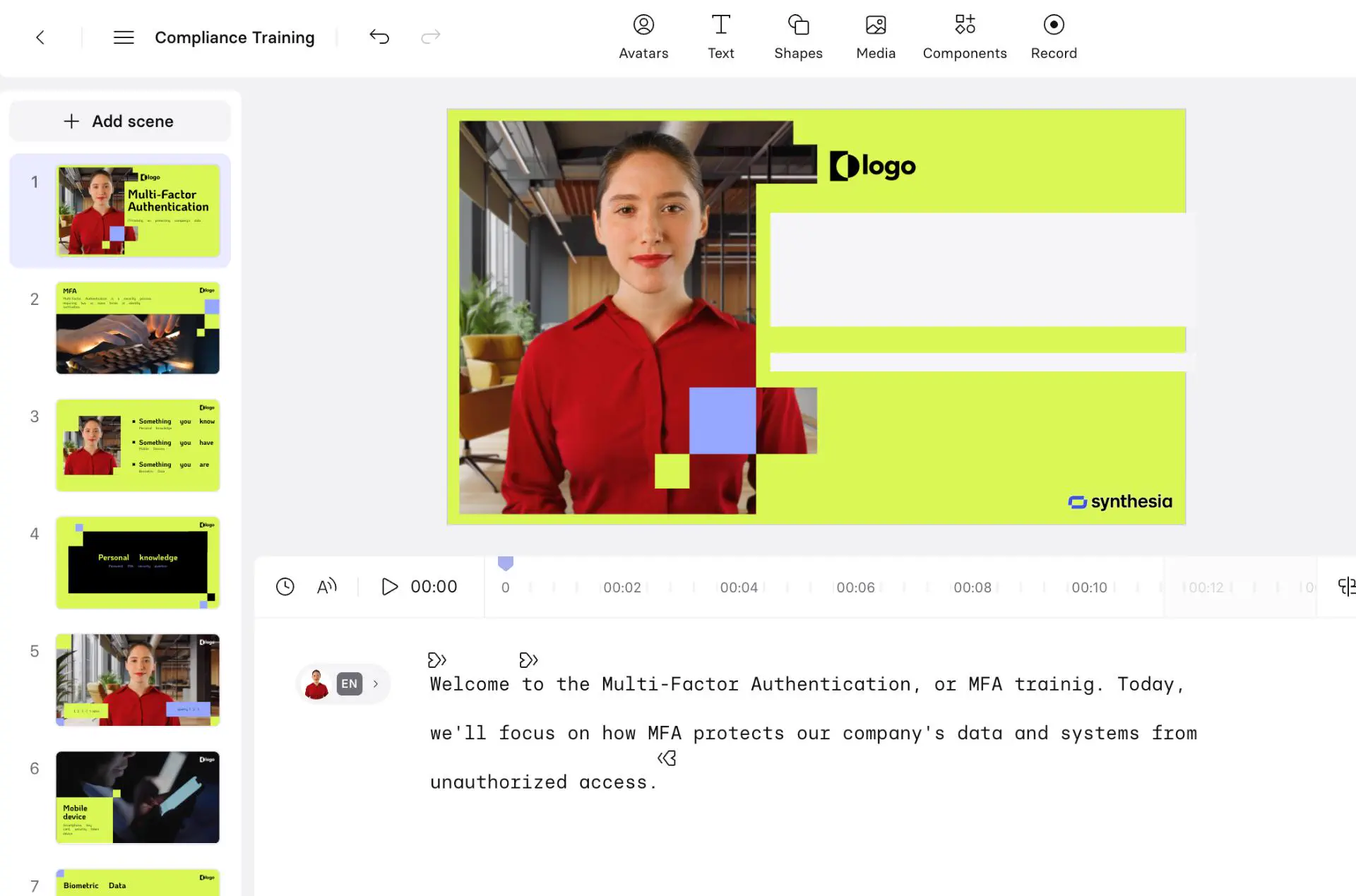
Since Synthesia is designed for business use, it couldn't generate the same type of creative output with the shared prompt. However, as a B2B AI video tool, it clearly shows strong potential for professional applications. The training and corporate-style videos look polished, easy to produce, and highly suitable for business communication.
Summary#
Not all AI video tools are built for the same thing. Viggle AI is the easiest way to make short viral clips. Motion transfer and face swapping, and build-in trending templates made it beginner friendly for anyone to start creating memes and short-form videos for TikTok and Instagram Reels without a complex prompts or scripts.
On the other hand, Runway, Veo, Kling, Hailuo and Higgsfield chase cinematic quality. They are powerful, but they take planning and strong propmpt to get you the shot you want. Synthesia stays focused on business-used path, with avatars for training, explainer, or corporate-used videos.
In the end, your best choice depends on your goals: Viggle AI for speed, accurate motion control and creativity, Runway and Veo for cinematic visuals, and Synthesia for professional business content. If you're looking to start creating short, viral videos right away, Viggle AI is the most practical place to begin.