
Veo 3.1 AI video generator
Google's video model, with the sound made in the same pass. Clips of 4 to 8 seconds at up to 1080p.
Pro, Live and Max plans, desktop web
What Veo 3.1 is best for, with prompts
Try a Veo 3.1 promptVeo 3.1 suits short scenes where the sound matters: a line of dialogue, a vertical clip for social, a move from one frame to another, or a product kept the same from three photos. On Viggle it is the only model with an Enhance prompt switch, and the cost shows on the Generate button before you generate.
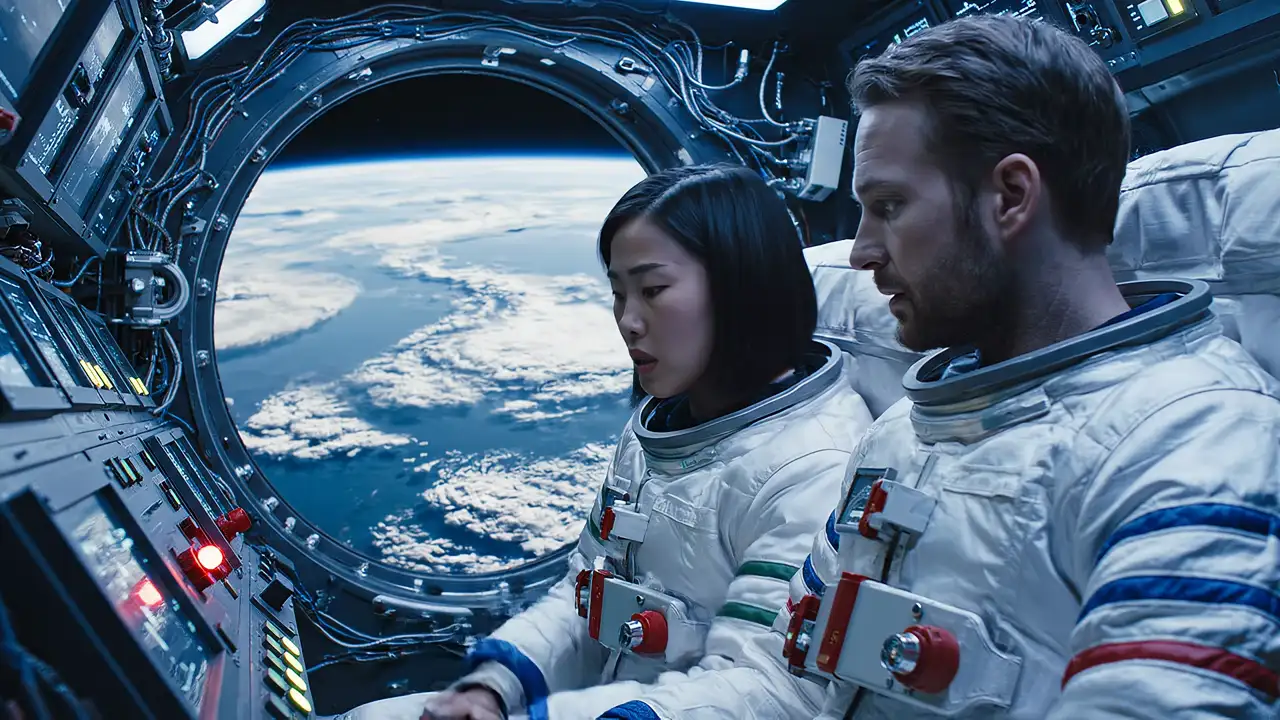
Veo 3.1 · 8 s · 1080p · 16:9 · text only
Two astronauts sit shoulder to shoulder in a cramped capsule, Earth filling the round window behind them. The woman taps a blinking gauge and says, "That's not supposed to do that." The man answers, "Then don't touch it." Low hum of the cabin, a soft alarm beep. Close two-shot, cool blue light.
Veo 3.1 on Viggle: length, frames and sound
Set up a Veo 3.1 clipOne generation makes one clip. These are the limits as Viggle runs Veo 3.1, which are narrower than what Google lists for its own platforms.
| On Viggle | What it means | |
|---|---|---|
| Length | 4, 6 or 8 seconds | Picked per clip; 8 is the default |
| Resolution | 720p or 1080p | Both cost the same credits |
| Aspect ratio | 16:9 or 9:16 | Landscape or vertical |
| Start from | A prompt, a first frame, a last frame or both | Frames set where the shot starts and ends |
| Reference images | Up to 3 | Keeps a character or product the same; the clip is then 8 s at 16:9 |
| Sound | Made with the picture | Write the lines and sounds into the prompt |
| Credits | 4 per second | 16, 24 or 32 credits a clip |
| Where | Pro, Live and Max plans | Desktop web only |
Limits as Viggle runs them, checked Nov 12, 2026.
What is Veo 3.1?
Try Veo 3.1Veo 3.1 is Google DeepMind's video model, introduced on October 15, 2025, that makes the picture and the sound together: dialogue, sound effects and ambience in one pass. Viggle did not build it; Viggle runs it on the Video page and bills it in Viggle credits, next to Seedance and MiniMax H3.
On Viggle it makes 4, 6 or 8-second clips at 720p or 1080p, landscape or vertical, from a prompt, a first and last frame, or up to 3 reference images that keep a character or product the same. Google's own platforms list more, such as 4K output and extending a clip past 8 seconds (Google Vertex AI docs, checked Nov 12, 2026); Viggle runs one clip at a time.
How to use Veo 3.1 on Viggle
Start a Veo 3.1 video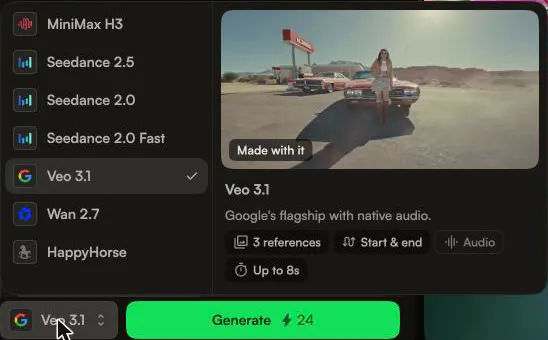
1. Pick Veo 3.1
Open Video on viggle.ai in a desktop browser. The model picker sits at the bottom, next to Generate: open it and choose Veo 3.1. Its preview card lists 3 references, Start & end, Audio and Up to 8s.
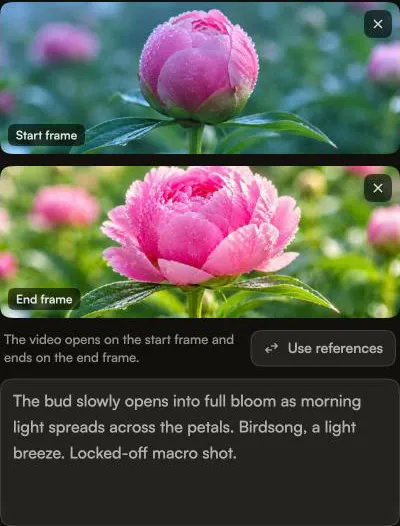
2. Add frames or reference images, then the prompt
Veo 3.1 opens on a Start frame and an End frame: set one, both or neither, and the video opens and ends on them. To keep a character or product the same instead, click Use references and Upload or Browse up to 3 images of it; the clip is then 8 seconds at 16:9. Then describe the shot, the lines and the sounds in the prompt box.
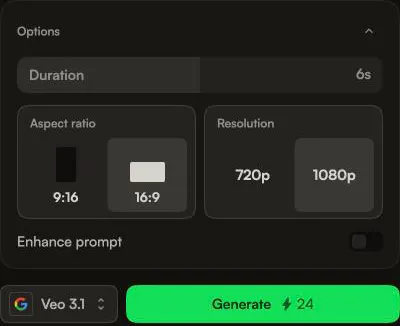
3. Set the length and generate
In Options, drag Duration to 4, 6 or 8 seconds, pick an Aspect ratio of 16:9 or 9:16 and a Resolution of 720p or 1080p, and switch Enhance prompt on or off. The Generate button shows the credits before you spend any: 24 for this 6-second 1080p clip. The finished clip appears under My videos, with a Details panel and Download.
Veo 3.1 price on Viggle
Veo 3.1 runs on the Pro, Live and Max plans at 4 credits a second, at either resolution: 16 credits for a 4-second clip, 24 for 6 seconds and 32 for 8. Pro's 80 monthly credits make two 8-second clips and one 4-second clip; Live's 200 make six 8-second clips.
Pro
Was $9.99
$7.99
/month
For creators who make more.
Upgrade- Veo 3.1
- 80 credits/month
- Faster video generation
- Up to 4 video generations at once
- Limited Real-Time Swap sessions
- Permanent asset storage
- No watermark
- Unlimited Multi-Track sessions
- Larger motion video uploads
- All models except Seedance
Live
PopularWas $19.99
$15.99
/month
For faster workflows.
Upgrade- Veo 3.1
- 200 credits/month
- Faster video generation
- Up to 6 video generations at once
- Stream 6+ hours in Real-Time Swap
- Permanent asset storage
- No watermark
- Unlimited Multi-Track sessions
- Larger motion video uploads
- Access to all models
Max
Best valueWas $79.99
$63.99
/month
For video production at scale.
Upgrade- Veo 3.1
- 800 credits/month
- Faster video generation
- Up to 10 video generations at once
- Unlimited Real-Time Swap sessions
- Permanent asset storage
- No watermark
- Unlimited Multi-Track sessions
- Larger motion video uploads
- Access to all models
Veo 3.1 FAQ
Open Veo 3.1 in ViggleIs Veo 3.1 free on Viggle?
No. Veo 3.1 needs a Pro, Live or Max plan, from $7.99 a month billed yearly, and Free accounts can't generate with it. For a free start, MiniMax H3 on the same Video page makes 5-second clips on free daily credits.
How long can a Veo 3.1 video be on Viggle?
4, 6 or 8 seconds per clip, with 8 as the default. With reference images the length is fixed at 8 seconds and 16:9. Viggle doesn't extend a Veo 3.1 clip, so for a longer scene use Seedance 2.5, which makes one take of up to 30 seconds.
Does Veo 3.1 make video with sound?
Yes. Viggle lists Veo 3.1 as Google's model with native audio, and Google describes it making dialogue, sound effects and ambience with the picture. Write the lines and sounds you want into the prompt. You can't upload audio to steer it.
What can't Veo 3.1 do on Viggle?
It can't make 4K, run past 8 seconds or extend a clip, and it takes images, not video or audio, as references. Aspect ratios are 16:9 and 9:16 only, and it runs on desktop web, not in a phone browser. To change a video you already shot, use Viggle Remake, which swaps people, objects and backgrounds in your own footage.
Why can't I see Veo 3.1 on Viggle?
Veo 3.1 runs on desktop web. In a phone browser, viggle.ai's Video page shows MiniMax H3 only, so open it on a computer. If Veo 3.1 is listed but generating asks you to upgrade, your account is on the Free plan, and Veo 3.1 needs Pro or above.
How does Veo 3.1 on Viggle compare to Veo 3.1 on Google's Vertex AI?
Google's Vertex AI docs list Veo 3.1 with 4K output, video extension and up to 4 clips per prompt (docs.cloud.google.com, checked Nov 12, 2026). On Viggle you get one clip per run at 720p or 1080p, 4 to 8 seconds, with no extension, billed in Viggle credits on a Pro plan or above, where Vertex AI needs a Google Cloud project.
How does Veo 3.1 compare to Seedance 2.5 and MiniMax H3 on Viggle?
All three run on the same Video page. Veo 3.1 makes 4, 6 or 8-second clips at 720p or 1080p with native audio on Pro. Seedance 2.5 runs to 30 seconds at up to 1080p on Live or Max. MiniMax H3 runs to 15 seconds at up to 2K and gives free accounts 5-second clips.
How does Veo 3.1 on Viggle compare to Veo 3.1 on invideo?
invideo lists Veo 3.1 with scene extension up to 148 seconds, up to 4K and an agent that writes the prompts for you (invideo.io/ai-models/googleveo, checked Nov 12, 2026). On Viggle you write the prompt yourself and get single 4 to 8-second clips at 720p or 1080p, with the credit cost shown before each one.
Other AI video models on Viggle
Compare models in Viggle- Seedance 2.5
Pick it for one take of up to 30 seconds.
- MiniMax H3
Pick it for free 5-second clips and phone browsers.
- Viggle Remake
Pick it to change a video you already shot.
- All AI models on Viggle
Every model Viggle runs, in one place.
Make your first Veo 3.1 clip with sound
Generate with Veo 3.1